Types of Receiver
The system generates pending invoice records for purchase receipts in a number of different ways.
Standard Purchase Orders
The most common type of pending invoice is generated in the standard purchasing flow.
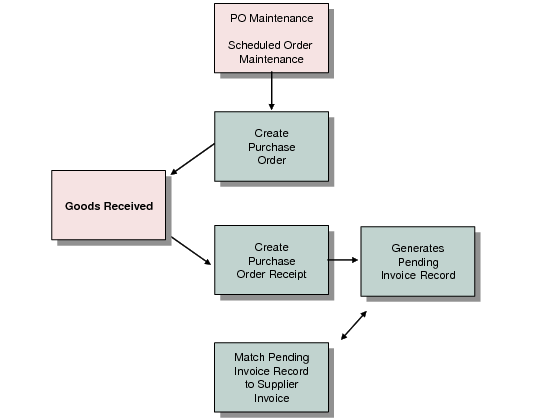
Goods are ordered from suppliers using purchase orders or scheduled orders. When the goods are received into inventory, you create a purchase order receipt, which in turn generates a pending invoice record. You then match this record against supplier invoices.
The receipt of goods debits Inventory and credits PO Receipt accounts.
Standard Purchase Order Flow
Only purchase orders for which a purchase order receipt has been created can be retrieved and matched.
Logistics Charges
Logistics charges are incurred when items are received into, shipped from, or moved between sites, and are payable to third-party suppliers. Types of logistics charges include freight charges paid to carriers, as well as insurance, duty, customs clearance, and handling charges. Logistics charge accruals are also referred to as pending invoices.
There are two types of logistics charges: inbound and outbound. Pending invoices for inbound logistics charges for purchased items are created automatically during purchase order receipts and shipments. Pending invoices for outbound logistics charges for items sold are created during shipment.
Terms of trade define the specific logistics charges associated with a purchase and whether the item supplier or the customer is responsible for payment. Logistics charges are not accrued when they are the responsibility of the item supplier, except for outbound charges, where your company is the supplier.
Separate sets of accounts can be used to track inbound and outbound logistics charges. Each logistics charge account is identified by an account code, an optional sub-account code, and an optional cost center code.
When you receive an invoice from the logistics supplier, you can match the invoice to the logistics charges pending invoices in the Logistic Charge tab of Receiver Matching.
For a complete description of Logistics Accounting, see
QAD Master Data User Guide.
Inbound Logistics Charges
Inbound logistics charges are the transportation costs associated with purchasing items from external suppliers. The system then automatically creates a pending invoice for the charges during purchase receipts. During purchase receipts, the system determines which logistics charges to accrue based on the terms of trade assigned to the order supplier.
The system then creates pending invoice records and receivers for each purchase order line.
For detailed information on how to set up Logistics Accounting for inbound logistics charges, see
QAD Master Data User Guide.
Outbound Logistics Charges
Outbound logistics charges arise from the transportation costs when you ship items to customers or to other company locations. Outbound logistics charges include the cost of freight only.
Normally, outbound logistics charges result from the sales order and distribution order processes, and accrue when the items are shipped. In order to accrue outbound logistics charges, you must first define freight charge data and freight terms, and then associate the freight terms with the customer.
When the system calculates freight terms, it takes into account the shipper, ship-from site, ship-to address, and shipment weight. For each shipment, a pending invoice is created for each logistics charge accrual.
Depending on the freight terms, outbound logistics charges can be paid by the supplier and recharged to the customer within the item price or as a trailer charge. They can also be paid by the customer directly to the carrier, insurer, customs, and so on.
If you are paying the logistics supplier and then passing the charge on to the customer, you can match the logistics invoice to the logistics charges pending invoices in the Logistic Charge tab of Receiver Matching.
For detailed information on how to set up Logistics Accounting for outbound logistics charges, see
QAD Master Data User Guide.
Tax
When pending invoices are created for the logistics charges, the system creates tax detail records and assigns unique tax transaction types to the logistics charge taxes.
For logistics charges, the Accrue Tax at Receipt field in Tax Rate Maintenance (29.4.1) determines when GL entries for taxes on both inbound and outbound logistics charges are created.
For inbound charges, taxes are calculated based on the tax class of the item supplier and the tax setting for the logistics charge in Logistics Charge Code Maintenance (2.15.1). When determining the tax environment for inbound charges, the system uses:
• The ship-from tax zone of the logistics charge supplier, if available; otherwise, the tax zone of the purchase order line site.
• The ship-to tax zone from the purchase order line site.
• The tax class of the logistics charge supplier, if available; otherwise; the tax class of the purchase order line site.
• If the system cannot find a tax environment, the default tax environment from Global Tax Management Control (2.13.24) is used.
Outbound logistics charges use the tax parameters on the trailer code associated with the freight charge on the order or shipment—they do not use the tax setup in Logistics Charge Code Maintenance (2.15.1).
The calculation of taxes on outbound logistics charges is similar to the tax calculation that occurs for the associated order. Unique logistics charge tax transaction types are used. These tax transaction types can be used to distinguish the tax on the freight accrual from the standard transaction tax.
For details on calculating taxes with Global Tax Management (GTM), see
QAD Global Tax Management User Guide.
PO Shipper/Invoices
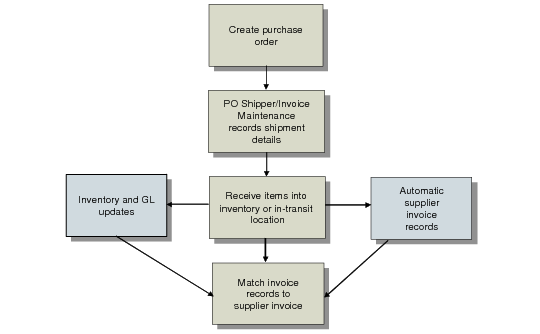
A PO shipper/invoice is a special type of shipper that combines receipt and invoice information in one document. These are typically used when liability for purchased goods is incurred when goods are shipped, rather than when they are received.
In this case, you receive the goods into an in-transit location, even though you do not physically have the items yet. You create the receipt based on the invoice you received from your supplier, and specify the supplier invoice number as an external reference. This creates pending invoice records. You can then match these in Receiver Matching by referencing the supplier’s invoice number. This matching process is a confirmation only. You cannot modify the prices or quantities for PO shipper/invoices.
Taxes on PO shipper/invoices are calculated on the item and product line purchased.
Shipper/Invoice Flow
For a complete description of shipper/invoices, see
QAD Purchasing User Guide.