Pro-Rating of Logistics Charges
When you have defined selection criteria and click Apply, a pop-up window opens with a line for every matching pending invoice header. If there has been a price variance between the charges accrued and the amount invoiced, you can enter a new matching amount. If you update the matching amount for a line and select OK, the system then pro-rates the price difference among all underlying detail lines for the pending invoice header, based on the amount that each detail line originally accrued.
Example:
You ordered two items from a component supplier. When you receive the goods, the accrued logistics charges for freight are 60 USD. A third-party carrier delivers the items and sends you a supplier invoice for the associated freight charges.
When matching the logistics supplier invoice, you retrieve the matching pending invoice in the Logistic Charge tab in Receiver Matching.
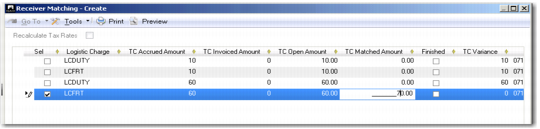
The freight price on the invoice from the logistics supplier includes a price variance of 10 USD. In the pop-up window, you enter a matched amount of 70, indicating the price difference of 10 USD. The pending invoice for freight duty is composed of two lines, one for each of the items shipped.
Item 01 has accrued 40 USD of freight duty and Item 02 has accrued 20 USD of freight duty. Therefore, freight charges for Item 01 were accrued at a rate of 2:1 relative to the charges accrued for Item 02. The system then pro-rates the price difference of 10 USD among the freight charge detail lines for the items. The matched amount for freight for Item 01 is updated to 46.67 USD, and the matched amount for freight charges for Item 02 is updated to 23.33 USD.
Logistics Charges Receiver Matching Pop-up
Note: All fields in the pop-up window are read-only, except the Sel field, which is used to select and deselect lines, and the TC Matched Amount and the Finished fields.
Sel
Select the field to indicate that the corresponding line matches the search criteria you have entered.
When you select the Sel field, the TC Matched Amount field is populated with the open amount.
If you leave the Sel field cleared, the TC Matched Amount field is set to zero.
Logistic Charge
This field displays the logistics charge code for the pending invoice to be matched.
Internal Ref
This field displays the internal reference number of the pending invoice. For inbound logistics charges, this is the receiver number. For outbound logistics charges, the internal reference is the shipment ID.
Ext Ref
This field displays the external reference number of the pending invoice. For inbound logistics charges, this is the packing slip number. For outbound logistics charges, it is the carrier reference ID or the bill of lading.
TC Accrued Amount
This field displays the original amount accrued for the pending invoice. When the accrued amount is different from the open amount, this indicates that the difference has been matched on a previous invoice.
TC Open Amount
This field displays the logistics charge amount that is still open (the TC Accrued Amount minus the TC Invoiced Amount).
TC Matched Amount
This field displays zero by default. If you select the Sel field, the system populates the TC Matched Amount field with the logistics charge open amount.
If required, adjust the amount to reflect changes between the pending invoice and the invoice from the logistics supplier. The system then pro-rates the difference between the accrued amount and the matched amount among the detail lines, based on the charges that each line originally accrued.
TC Variance
This field displays the difference between the accrued amount and cumulative matched amount.
Finished
Select the field to post the difference between the accrued amount and the cumulative matched amount to the logistics charge variance account.
The default for this field is set using the Close Accruals on First Invoice field in Logistics Charge Code Maintenance.
TC Invoiced Amount
This field displays the cumulative amount invoiced to date (not including the current transaction). This field contains a value if part of the pending invoice was paid to a previous supplier invoice.
Pro-Rate Variance
The value in this field is read-only and is updated based on the value of the TC Variance field.
If TC Variance is not equal to zero, the system selects the Pro-Rate Variance field.
If TC Variance is zero, the system clears the Pro-Rate Variance field.
Order
This field displays the purchase order, sales order, or distribution order that generated the logistics charges.
Supplier
This field displays the logistics supplier, if this information is available.
Transaction Date
This field displays the date on which the invoice was recorded.