Changing Payment Formats and Supplier Records
The system also requires that the bank account you use in a payment selection must be defined on the Banking tab of the supplier record. When you change the bank account or payment format in a payment selection, the system automatically creates the new number and format combination as a new line on the supplier Banking tab. When the account number and format combination has identical payment attributes and values to the previous payment format, the system retains this information in the definition.
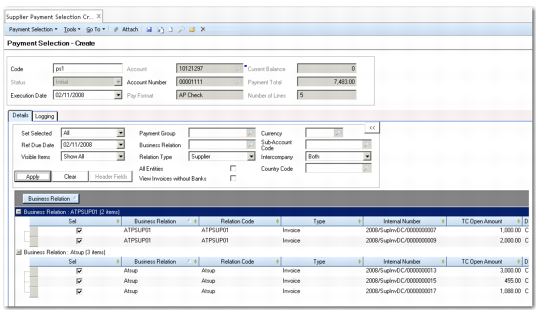
Example: You create a payment selection PS1 to pay invoices from your bank account 10121297, account number 00001111. Account number 00001111 is associated with the payment format AP check, which is an Accounts Payable check format in US dollars.
You retrieve invoices from all suppliers for whom these account and format details have been defined. The system displays two invoices from Supplier A and three invoices from Supplier B in the results grid. You save the payment selection with an Initial status for internal approval. Following approval, you reopen the payment selection to process the payment. The Current Balance field on the Bank area of the selection indicates that because of other activity on this account, there are now insufficient funds in the account to complete the payment.
Payment Selection for Multiple Suppliers
You select another account, 10121900, with an account number 11112222 and an associated electronic transfer format. This payment format includes attributes for a bank reporting ID and a payment expiration date. Because these attributes cannot be applied to the original invoices, the system prevents you from saving this change. Instead, you select account number 22223333 for 10121900, which also has an associated AP check format in US dollars (also named AP check). The new format matches the original format, and you can now save the change and proceed to register the payment selection.
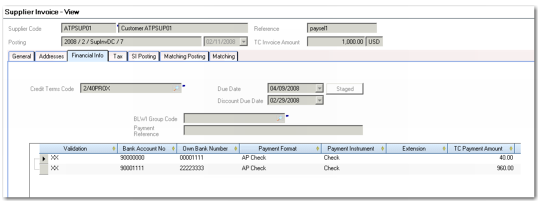
The system replaces the account and format details on the Financial Info tab of each of the invoices for both suppliers. Therefore, account 10121297, account number 00001111, and format AP check are replaced with account 10121900, account 22223333, and format AP check. This new combination is also added as a new line on the Banking tab of both suppliers.
Supplier Invoice Change of Bank