Supplier Invoice Register Report
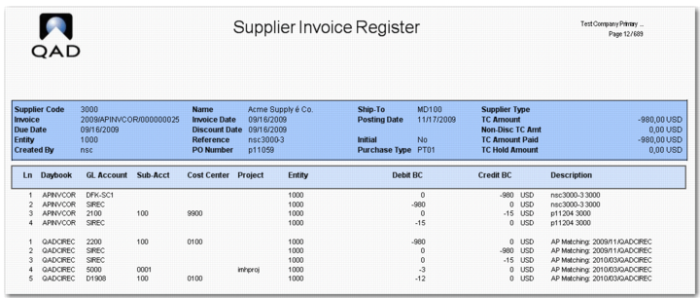
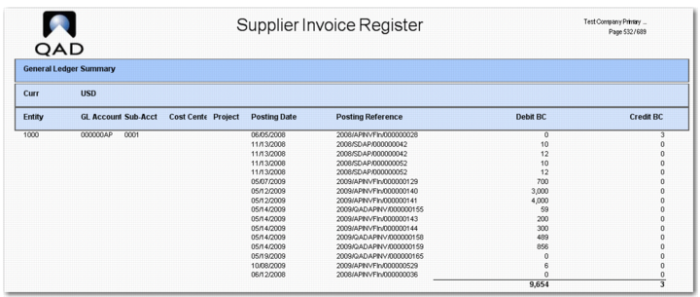
The Supplier Invoice Register report (28.17.19) displays a list of supplier invoices and their posting details and receipt data, if applicable. You can, optionally, include a GL Summary section at the end of the report, which displays totals by GL account. At the end of the month, you can use the GL Summary section of the report to check the allocation of costs arising from supplier invoices.
The following are the report selection criteria:
• Supplier (From/To range)
• Entity
You can only select entities from the current domain.
• Posting Date (From/To range)
• Supplier Type
• Purchase Type
• Currency
If you specify a currency, the report only displays invoices with that transaction currency. If you leave the field blank, the report displays invoices in all currencies.
• Open Only
Select Yes to include open invoices only. If you select No, the report includes both open and closed invoices.
• Include Initial
Select Yes to include initial invoices in the report output. If you select No, the output excludes initial invoices. The default is No.
• Sort by
The sorting options are Supplier Code or Chronological.
If you select Supplier Code, the output is sorted by supplier code, and then by entity, daybook, and voucher.
If you select Chronological, the output is sorted chronologically by entity, daybook, and voucher.
You can control the level of detail printed using the following options:
• Invoice Detail
The options are Summary or Detail.
• If you select Summary, the report only includes invoice header data.
• If you select Detail, the report includes header and posting information.
The posting information includes both the supplier invoice postings and the matching postings. For cross-company allocations, the report also displays the allocation posting in the target entity.
• Receipt Data (Yes/No)
This option controls whether the report includes receipt information for invoices that are receiver matched.
If you select Yes, the report lists matched items, quantities, and amounts for invoices that are receiver matched.
If you select No, the report does not display receipt information.
• GL Summary (Yes/Only/No)
This option controls whether the report includes a GL Summary section.
If you select Yes, the report includes a GL Summary section, which summarizes the posting information for all invoices in the report. The GL Summary is sorted by GL account, sub-account, cost center, and project. Sub-totals are provided for all GL account, sub-account, cost center, and project combinations.
If you select Yes, the GL Summary section is displayed at the end of the report.
If you select Only, all other sections in the report are suppressed, and the report only contains the GL Summary section. This option lets you quickly gain an overview of the supplier invoices without having to navigate many pages of output.
If you select No, the report does not include a GL Summary section.
Supplier Invoice Register Report, Showing Matching Information
Supplier Invoice Register Report, Receipt Information
Supplier Invoice Register Report, General Ledger Summary