Receiving Confirmation or Rejection from the Bank
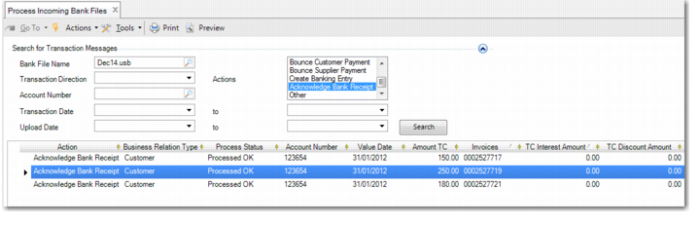
The bank updates the bank file and returns it to you. You load the file into the system using EDI and process the file using Process Incoming Bank Files. Specify the bank file name to refine the selection and select Acknowledge Bank Receipt in the Actions field.
The grid in Process Incoming Bank Files contains a line for each invoice or each invoice stage, in the case of staged payments. The Invoices field in the grid displays the 10-digit internal reference number for each invoice or invoice stage.
Process Incoming Bank Files, Acknowledgement of Bank Receipt
If the payment was accepted by the bank, the bank title reference is stored against the payment selection when the incoming bank file is processed. The bank creates a title number for each invoice or for each invoice stage, in the case of staged payments.
When the bank sends the bank title number, you must set up this instruction code in Bank File Format Maintain with the Acknowledge Bank Receipt action. See
Mapping Transaction CodesNote: The bank title number is used in Brazil. Some payment systems may not provide this information.
Your bank replies to each notification with an acknowledgement or rejection message. If you are operating under Brazilian banking practices, you must process the acknowledgement to update the selection with the Bank Title number. You must investigate rejection messages and rectify the issue that caused the message. Re-execute the payment selection when you have addressed the issues.