Scanning the Boleto Bancário Barcode
In Supplier Payment Reference Modify, you can also locate an invoice or invoice stage using a barcode scanned from a printed boleto bancário.
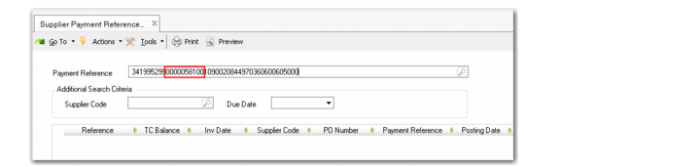
The barcode on a boleto bancário contains 44 digits. After it is scanned, it is transformed to 47 digits. The three extra digits are check sums. 10 of the digits represent the payment amount and are used to retrieve all matching invoices.
1 Install the barcode scanning software as indicated by the manufacturer.
2 Open Supplier Payment Reference Modify and position the cursor in the Payment Reference field.
3 Use a smart phone, tablet, or hand-held scanner to scan the barcode from a boleto bancário. A 47-digit code is scanned into the Payment Reference field.
Supplier Invoice Reference, Scanned Reference Number
When the
boleto bancário is scanned, the invoice amount is normally in the middle of the barcode, as indicated in
Supplier Invoice Reference, Scanned Reference Number.
4 Click on the Search button in Supplier Payment Reference Modify.
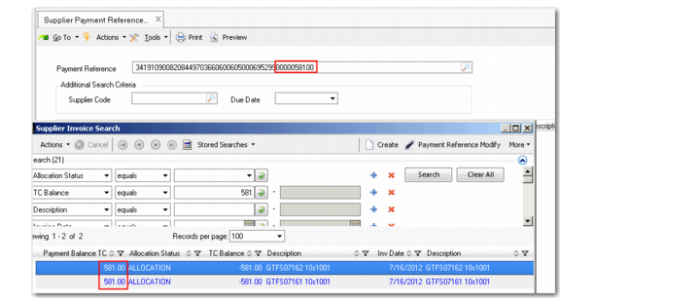
This opens a Supplier Invoice Search window, which retrieves and displays any invoices or stages for the same amount. At the same time, the system reformats the scanned
boleto bancário number so that the amount is displayed at the end of the payment reference code, as shown in
Supplier Invoice Reference, Reformatted Reference Number.
Supplier Invoice Reference, Reformatted Reference Number
Alternatively, instead of clicking the Search button, you can use Alt+L to open the Supplier Invoice Search window. If there is only one matching invoice, this is automatically returned to the grid.
The transformed 47-digit reference is also populated in the Payment Reference column in the grid.