Creating Cash Entries
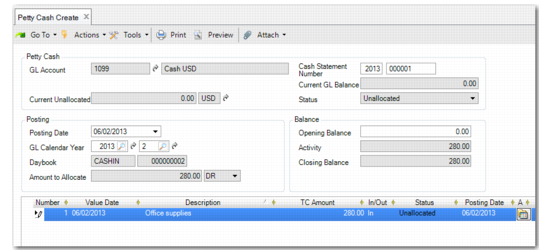
Use Petty Cash Create to create a petty cash entry.
Petty cash entries can be saved in draft format when Draft Instances is selected in Change System Settings (36.24.5.1). When you save a record in draft format, none of the system validations are performed. You can then return later to complete the record by choosing the Petty Cash Browse Drafts activity and selecting the record you want to finish from the list. For more information on drafts, see
Introduction to QAD Enterprise Applications User Guide.
Petty Cash Create
Field Descriptions
GL Account
Specify your petty cash account. The lookup retrieves GL cash accounts and their descriptions only.
GL Balance
This field indicates the current balance of the cash account selected.
Unallocated Cash Balance
This field displays the amount in cash entries that has still to be allocated. Use Petty Cash Allocate to retrieve these entries and complete the allocation.
Status
This field indicates the status of the unallocated amounts.
Posting
Posting Date
This field indicates the posting date of the cash entry. This defaults to today’s date.
GL Calendar Year
This field indicates the posting GL calendar year and GL period. You can modify these values.
Daybook
This field indicates the daybook and daybook number for the current transaction. The daybook type is Cash Entries. The system retrieves the Cash Received daybook profile for cash movements into the account, and the Cash Paid daybook profile for movements out of the account. See
Setting Up Petty Cash. Separate cash-in and cash-out daybooks are mandatory requirements in some accounting systems.
Amount to Allocate
This field displays the amount to be allocated in this cash entry, and whether this is a debit or credit to the account. This amount is retrieved from the amount you enter in the TC Amount field in the grid.
Balance
Opening Balance
This field indicates the balance of the account before the cash movement.
Activity
This field indicates the total amount of the cash movements.
Closing Balance
This field indicates the balance of the account after the cash movements.
Grid
Number
This field indicates the system-generated number of the cash entry. Insert a new line in the grid for each new cash entry.
Value Date
This field indicates the value date of the entry. The value date is the date on which the bank transaction occurs. The default is the posting date.
Description
Enter a brief description (maximum 40 characters) of the cash entry.
TC Amount
Enter the cash entry amount in the transaction currency.
In/Out
Indicate if this is a cash movement into the account (for example, cash received from customers, or refund of expenses) or out of the account (cash supplied for expenses, or as a cash payment to suppliers). Movements in are automatically assigned the daybook defined in the Cash Received daybook profile, and movements out are assigned the daybook defined in the Cash Paid daybook profile.
Status
This indicates the current status of the cash entry.
Allocate
Click Allocate to select an allocation method. Petty Cash Create uses the same allocation methods as banking entries. See
Allocating Bank Entry Lines.
Note: Create prepayments for cash in advance transactions.
Information
Enter additional information about the cash entry.
Scale Factor
This indicates the scale factor applying to the exchange rate in use for foreign currency payments. The system uses the Cash exchange rate for cash entries when this rate is defined. If not, the default rate used is the Accounting rate. See
Exchange Rates.
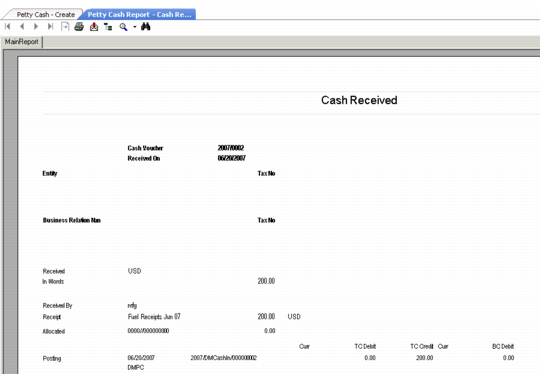
Print
Select this field to print a report of this petty cash entry. The system automatically displays the report on the screen. You can then print it as a receipt for the transaction.
Petty Cash Report