Exchange Rates
Use the Exchange Rate (26.4) activities to create, view, modify, and delete exchange rates, which are applied to multiple-currency transactions. Exchange rates are stored at the shared set level. Therefore, any changes made to exchange rates in a domain affect all other domains using the same shared set.
The chart of accounts must include a single realized and unrealized gain and loss account, and an exchange rate rounding differences account. These are used for all currency exchange conversions in the system. See
System Accounts for details on creating unrealized and realized loss/gain accounts.
Exchange rates are specified as the amount by which you multiply a single unit of a From Currency to reach the equivalent number of the To Currency units. Exchange rates can be expressed in up to 10 decimal places.
Example: If 1 pound sterling is equivalent to 1.40 euros, the exchange rate is expressed as follows:
From Currency Code: GBP
To Currency Code: EUR
Exchange Rate: 1.4000000000
To enter the exchange rate with the From Currency as EUR and To Currency as GBP, you specify:
From Currency Code: EUR
To Currency Code: GBP
Exchange Rate: 0.7142857143
Note: You can create an exchange rate in only a single direction; you cannot create both an exchange rate and a reciprocal rate.
Exchange rates can have both a start date, and an end date. An exchange rate between two currencies is superseded by an exchange rate of the same type between the same two currencies with a later start date.
Exchange rates can also have a scaling factor. Use scaling factors for currencies that have a very small value relative to other currencies. The actual exchange rate used is the product of the entered exchange rate and the scaling factor. The scaling factor can have up to seven decimal places.
Example: If 1 pound sterling is equivalent to 250,000 units of Turkish lire, the exchange rate could be expressed as follows:
From Currency Code: TRL
To Currency Code: GBP
Exchange Rate: 4.0000000000
Scaling Factor: 0.0000010
This means that an invoice for 1,000,000 TRL is equal to 4 GBP.
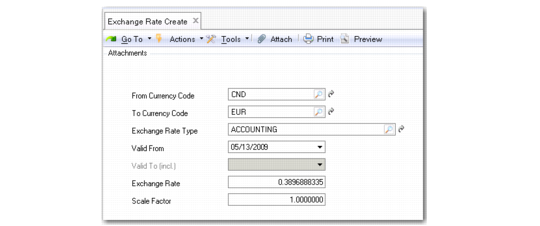
Exchange Rate Create
Field Descriptions
From Currency Code
Enter the first currency of the exchange rate relationship. It must be a valid, active currency, and cannot be the same as the To Currency Code.
To Currency Code
Enter the second currency of the exchange rate relationship.
Exchange Rate Type
Specify the business area where the exchange rate is applicable.
See
Exchange Rate Types for a list of values.
Valid From
Enter the start date of the currency exchange relationship. The effective period of an entry cannot overlap with another entry for the same relationship. The exchange rate relationship is used as the default for all transactions during the specified time period.
Valid To
Specify the date after which the exchange rate type becomes inactive.
When creating a new exchange rate type, the system proposes a default validity end date based on the value you entered in the Default Validity field in Exchange Rate Type Create for the exchange rate type. However, you can overwrite the default value.
You can only specify a value in the Valid To field if:
• The Use Validity End Date field is selected in Exchange Rate Type Create for the exchange rate type
• You are using Exchange Rate Create.
• You modify an exchange rate for which the Valid From field contains the highest value (latest date) for all existing exchange rate records for the same combination of From Currency Code and To Currency Code. Otherwise, the Valid To field is inactive when you modify an exchange rate.
Validity end dates are enabled in Exchange Rate Type Create, and the system contains two exchange rate records for Euros to US dollars.
• Record 1 has a Valid From date of May 20 and a Valid To date of May 24.
• Record 2 has a Valid From date of May 25 and a Valid To date of May 30.
In Exchange Rate Modify, you can only change the Valid To date for exchange rate Record 2 because its Valid From date is later than and supersedes that of Record 1.
Exchange Rate
Enter the exchange rate. Exchange rates are specified as the amount by which you multiply a single unit of a From Currency to reach the equivalent number of the To Currency units
Scale Factor
Enter a number used in the exchange rate calculation to adjust the amount of the From Currency. This is typically used in hyperinflationary environments when the differences between currency values is large.