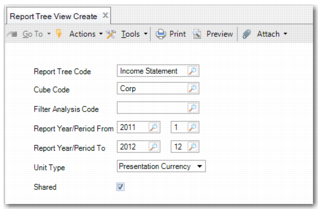
Report Tree View Create
To use Report Tree Drill Down, create a view of the relevant report tree using Report Tree View Create (25.16.7.1). Each field on this screen corresponds to a dimension of the report cube.
Report Tree View Create
Report Tree Code
Enter a meaningful report tree code. This field is mandatory.
Cube Code
Enter a cube code. This field is mandatory.
Filter Analysis Code
You can use this field to specify a particular analysis code to filter the view you create. This field is optional.
Report Year/Period From
Specify the start period for your report tree view. This field is mandatory.
Report Year/Period To
Specify the end period for your report tree view. This field is mandatory.
Unit Type
You can choose to display by presentation currency or by source currency. The source currency depends on a setting in your cube. Therefore, the source currency is either the statutory currency or the base currency.
Shared
If you do not want other users to see your view, clear this field. By default, this field is selected. This means that other users can see this report tree view.
To create the report tree view, click Save and Create.
Report Tree View Modify (25.16.7.2) enables you to search for an existing report tree view to modify. Report Tree View Delete (25.16.7.3) enables you to delete a report tree view. After you create a report tree view, you can drill down into it using Report Tree Drill Down (25.16.7.4).