Financial Report Writer
The following topics describe how to configure and use Financial Report Writer.
OverviewIntroduces Financial Report Writer functions and concepts.
Setting Up Financial Report WriterDescribes how to prepare Financial Report Writer for use.
Generating CubesDescribes how to generate a cube you have created.
Report Cube Consistency CheckBrowse the balances created during the cube generation.
Cube DaemonGenerates updates for report cubes.
Report Analysis CodesFacilitate report creation by creating report analysis codes.
Report TreesCreate and maintain a report tree using Report Tree Maintenance.
Report Tree Excel IntegrationCreate and maintain a report tree using Excel.
Report Column GroupDefine the number of columns, column content, and presentation details of a report.
Maintaining Report MastersCreate report master records for different report layouts.
Financial Report RunRun, view, and print a financial report.
Using Budgets in Financial ReportsCreate budgets for use in Financial Report Writer.
Financial Report AnalysisDrill down into a Financial Report to analyze balances and investigate source postings.
Overview
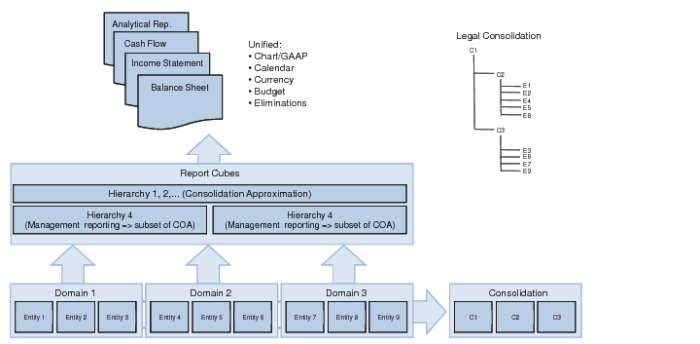
Financial Report Writer is a group reporting solution that combines the existing Financials reporting functionality into a single user experience. It includes multi-entity and multi-domain reporting that lets you map charts of accounts and approximate consolidation results.
Financial Report Writer Concepts
Financial Report Writer aggregates financial statements that are built on:
• A common chart of accounts (COA) including all dimensions available in Financials, such as domain, entity, layer, GL account, sub-account, cost center, project, SAFs, intercompany, and currency
• A common currency—the presentation currency
• A common calendar
Financial Report Writer presents the financial data in a hierarchy, which can include multiple GAAP views. Financial Report Writer provides a Legal Consolidation view and a Management Reporting view. The Legal Consolidation view is an approximation of the posted consolidation, which covers the full COA and is bottom line balanced (debits equal credits). The Legal Consolidation view also allows you to verify the completeness of the data.
You can also omit COA elements intentionally. For example, you can eliminate intercompany transactions, where an intercompany sales balance in one entity is netted against the corresponding intercompany purchase balance in another entity.
Financial Report Writer lets you create reports for subsets of the COA for management reporting purposes. For example, you can display the financial results for a given product line across all domains.
Financial Report Writing Concepts
You can use Financial Report Writer to create multiple report cubes with different calendars and presentation currencies. Financial Report Writer provides a good balance between predefined selections in the setup and filtering at reporting time. You can create new report structures or change existing report structures at any time. You can also rebuild the balances stored in the cubes when new cubes are introduced or when structural changes are made to the reporting COA.
Financial Report Writer also allows you to reuse a reporting hierarchy (tree) recursively in other hierarchies. You can use an existing reporting hierarchy as a template to copy and reuse when you create a hierarchy.
You can also use reporting hierarchies to create standard Balance Sheet, Income Statement, and Cash Flow reports. If you use Financial Report Writer to create a report for a single domain, the setup is limited to a single screen.
You can also create budgets for use in financial reports. This facility enables you to compare budget amounts with actual postings. See
Financial Report Run.
Financial Report Writer versus Consolidation
Financial Report Writer is closely related to consolidation, although they are different activities with common traits. Both ensure that the activities of subsidiaries are represented in aggregated financial statements.
Consolidation allows you to obtain an aggregated view by combining balances from individual entities in a single consolidation entity. The consolidation process creates new postings in the consolidation entity and is performed for statutory purposes and is part of the period closing activities.
Financial Report Writer allows you to produce an aggregated financial report across a series of individual entities. You can create these reports at any time of the year and without creating postings. Financial Report Writer provides an approximation of the consolidation results because not all elements are known at the time of reporting. For example, the period-end exchange rates are often unavailable when you run Financial Report Writer during the year. In addition, some corrections on the accounts may not yet be applied.
Financial Report Writer also provides financial management reports, such as day-by-day information on income and expenses across all entities and domains. You can group these results by product line, division, or department. The daily balance sheet position of assets (customers, inventory, cash, WIP) and liabilities (suppliers, loans, taxes due) may also be of interest to management.