Linking Payment Formats to Bank Accounts
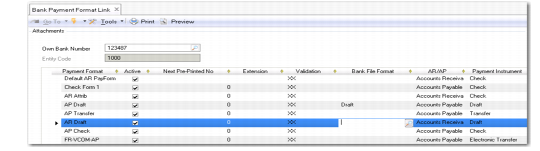
Use Bank Payment Format Link (25.11.2) to link payment formats to bank accounts. You select the bank account by its number, and only GL accounts for which you have defined the account number can be linked to a format.
You can link as many formats as required to the account, although you normally require only one format (for example, check, draft, or electronic transfer) for each customer or supplier. When you select multiple formats for the account, all formats are linked to the same account number. When you create a payment selection, the other formats defined for the account are selectable in the account number browse. See
Supplier Payment Selections.
Once you select a format, the system loads the format details into the grid as read-only fields.
Bank Payment Format Link
Field Descriptions
Own Bank Number
Select the account number of the bank account to which you want to link a payment format.
Entity Code
This field displays the entity associated with the bank account. This is usually the current entity, and the bank account is normally your own bank account.
Payment Format
Specify a payment format to link to the bank account.
Next Pre-Printed Number.
Enter an initial number for supplier check print runs. The system automatically uses this number to begin check print runs when the payment format is associated with the supplier payment.
Extension
This field indicates the bank extension number, if any.
Validation
This field indicates the account number validation, if any.
Bank File Format
Select a bank file format when you intend to generate automatic AR and AP payments from electronic files produced by this bank account. You define bank file formats using Bank File Format Maintain.
AR/AP
This field displays the module (Accounts Receivable or Accounts Payable) for the payment format.
Payment Instrument
This field displays the payment instrument for this format: Check, Draft, Direct Debit, Transfer, Electronic Transfer, Direct Debit, Promissory Note, or Credit Card.
Payment Type
This field displays the payment type for this format: Domestic, Foreign, or Both. See
Payment Format Maintenance.
Bank Account
Specify the GL account of type bank to which you want to link this payment format. The lookup displays the bank account number, and retrieves only GL accounts for which an account number has been defined.
Bank Charge Applies
Select this field when the bank charges for payments made in this format. If the supplier pays the bank charge, the system calculates the charge and deducts it from payments before sending these payments to the supplier. See
AP Bank Charges. This field is hidden by default and can be displayed by right-clicking the column header, choosing Columns, and selecting the Visible option in the appropriate row.
Last Modified User/Date/Time
These read-only fields display the ID of the user who last updated this record and the date and time of update.