Setting Up Budgets
Budget Groups
Use Budget Group activities (25.5.2) to create, view, modify, and delete codes for grouping any combination of accounts, sub-accounts, cost centers, projects, and SAFs used to update actuals for a budget topic. This facilitates budget setup because you can link a group to a budget topic, rather than linking each COA component individually. The use of budget groups is optional.
You link a COA component to a budget group by assigning a group name when you create or modify the component definition in, for example, Account Create or Cost Center Create.
Example: Your budget structure contains a topic called Current Assets. Create a budget group called Current Assets, and add all asset accounts (inventory, customer, and so on) to this budget group using GL Account Create or GL Account Modify. Link the budget group to the Current Assets budget topic in the Structures tab in Budget Create.
When a budget group has been used in a COA link, you cannot delete it from the system.
See
Setting Up General Ledger for information on assigning COA components to budget groups.
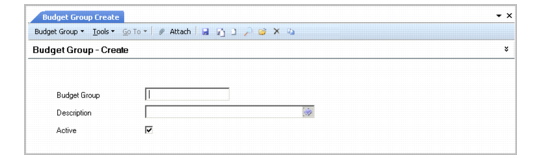
Budget Group Create
Field Descriptions
Budget Group
Specify a code (maximum 20 characters) to identify the budget group.
Description
Enter a brief description (maximum 40 characters) of the budget group. You can optionally enter descriptions in more than one language. For more information on the Translation Option, see
Introduction to QAD Enterprise Applications User Guide.
Active
Select to make the budget group active. You can only use active groups in COA linking.