Creating a Consolidation
You run the consolidation cycle you have defined using Consolidation Create (25.19.2.1) within the consolidation entity. You can run the consolidation for official or management layer transactions, but not simultaneously.
Before creating a consolidation, you must ensure that:
• The GL periods in the source entities are locked.
• No unposted transactions exist in the source entities.
• You have mapped all source accounts that are referenced in postings.
You select source and target layers when configuring the consolidation. You can only select the official or management layers for source entities. When you select a management source layer, the system retrieves all the management layers created in the source entity. For example, if you have created management layers for different types of IFRS or GAAP reporting, the system retrieves all of these layers and displays them on the Source Layers tab. You then choose which layers to include.
When the consolidation is completed, you can review the GL postings and generate reports.
As a result of the consolidation run:
• The daybooks in the consolidation entity are updated with the GL transactions in the source transaction currency and in the target base or consolidation currency.
• The system locks the entity, period, and layer combination in order to avoid another run. If you are running the consolidation in the transient layer, you have the option to review the postings, and to delete this consolidation and create a new one if necessary. Consolidations in the official layer cannot be deleted.
• The system keeps a history of all consolidation runs with the following attributes:
• Consolidation run number
• Date and time of the run
• Source entities
• Periods
• Layer type
Use the Consolidation activities to create, delete, and view consolidations:
• Create. Configure and run a new consolidation. You run the consolidation by clicking Save.
• View. Display all consolidation runs with all fields in read-only mode.
• Delete. Delete a consolidation run. You can only delete consolidations in the transient layer.
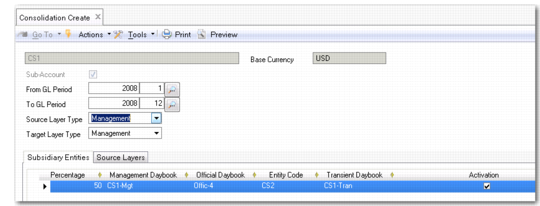
The system displays the consolidation entity and its base currency at the top of the Consolidation Create screen.
Consolidation Create
Field Descriptions
From/To GL Period
Specify the from and to GL periods for this consolidation run.
Target Layer Type
Specify the layer type to use in the consolidation entity. You can select the official, management, or transient layer.
Source Layer Type
Specify the layer type to use in the source entity. You can select the official or management layer only.
The Subsidiary Entities tab displays the source entities in the consolidation cycle and the daybooks used for their transactions.
The Source Layers tab displays the source layers used in this consolidation run. When you select the management layer as the source layer type, the system retrieves all management layers created in the source entity. These are selected by default. You can deselect any layers you do not want to include in the consolidation.