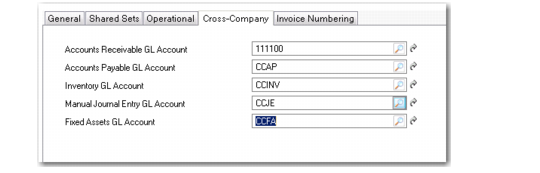
Cross-Company Tab
Use the Cross-Company tab to set up cross-company accounts to track amounts for these transactions between entities:
• Accounts Receivable (AR)
• Accounts Payable (AP)
• Inventory Control
• Manual Journal Entry
• Fixed Assets (FA)
These accounts must be cross-company control accounts.
When an operational transaction references more than one entity, the system automatically creates the required intercompany balancing entries using these accounts. The default sub-account associated with the account in GL Account Create is also used in the cross-company posting. Manual cross-company postings call also be made in various financial functions. See
Intercompany and Cross-Company Transactions.
Note: Cost centers, projects, and SAF analysis cannot be used with cross-company accounts.
You can leave these fields blank when the domain associated with the entity is unconfirmed, but you cannot confirm the setup of a domain until the cross-company accounts are defined.
These fields are required even when a domain has only a single entity. This ensures that if another entity is added later, transactions are created properly.
Domain Create, Cross-Company Tab