Defining the GL Calendar
The financial calendar consists of user-defined GL calendar years and GL periods. Creating GL periods lets you divide the fiscal year into smaller subsets in order to manage and report on business activities. Opening or locking a GL period allows an organization to better control its accounting and reporting processes.
Operational transactions are entered with a GL effective date. This date—and not the transaction date, although they are often the same—determines which GL calendar period the transaction affects.
By default, the GL calendar year consists of twelve monthly GL periods. Each GL period does not have to correspond to a calendar month. You can define custom start and end dates for each GL period to correspond with your accounting cycles, and the GL calendar year can exceed twelve calendar months in length. The GL calendar year is defined at the domain level; all entities within a domain use the same GL calendar year definition.
Important: You cannot create GL periods and tax periods unless you have confirmed the setup of the domain in which you are working.
The system contains two functions related to GL calendars and periods:
• Use the Domain GL Period function to create, modify, and view the GL calendar year and its related GL periods for a specific domain. The GL periods defined at the domain level are copied to all entities linked to the current domain. GL periods created with this function always have a Normal period type.
• The Entity GL Period function lets you apply GL period settings to entities and lets you lock and report for GL periods per entity or entity group. For increased granularity, you can apply daybook masks to the period to prevent particular types of postings within that period. When you lock a GL period for a single entity, it remains open for other entities in the same domain. Using the Entity GL Period function, you can also create, modify, and delete entity-specific GL periods with a type of Correction or Year-End Closing. Normal GL period types are read only.
Note: A GL period cannot be closed if unposted transactions exist with effective dates within the GL period.
Note: You cannot delete a GL period if it is closed, or if it is open and has had activity posted to it. In addition, you can delete only GL periods of type Correction.
Two other system functions can be used to define specialized calendars:
• Use Tax Period Create (25.4.5.1) to define entity-based calendars for tax reporting periods. When defined, closing a tax period prevents additional tax transactions from being posted. Tax periods and reporting are described in
QAD Global Tax Management User Guide.
• Use Budget Report Period Create (25.4.5.1) to define periods used within the budgeting area. Budget periods are described in detail in
Budget Report Periods.
The ability to filter based on the daybook code facilitates period close because you can easily identify and review transactions of a certain type and identify unusual activity.
Before you close a GL period, verify that there are no unposted transactions, such as those created in the operational activities. You can run the Unposted Transaction Register report to identify transactions not yet posted to the general ledger.
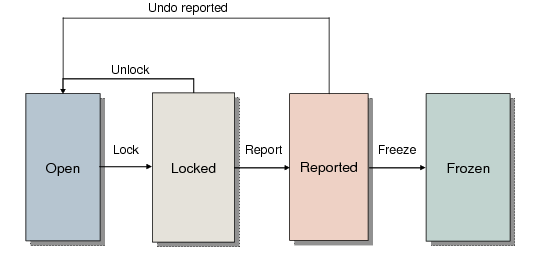
Month-End GL Period Flow
Year-End Closing
Closing the GL calendar year has the effect of changing the status of all of its GL periods to frozen, and of marking all periods as reported.
Year-end closing postings are done only at account and sub-account level, and in the base and management currencies only.
Validate the year-end closing by manually running closing reports on every period. See
Year-End Transactions.