Creating Employees
Use the Employee activities (37.1.7) to create, view, modify, or delete an employee. A record can be deleted only if it is not referred to in the system. Otherwise, you can mark the record inactive.
Employees are associated with entities. They are referenced when defining engineers in the Service/Support Management module and also for labor recording for work orders and repetitive schedules. If you define employees as engineers, an e-mail can be automatically sent to the members of the EmployeeNotify role responsible for creating engineer data when a new employee is created.
Only active employees can be selected in these operational functions.
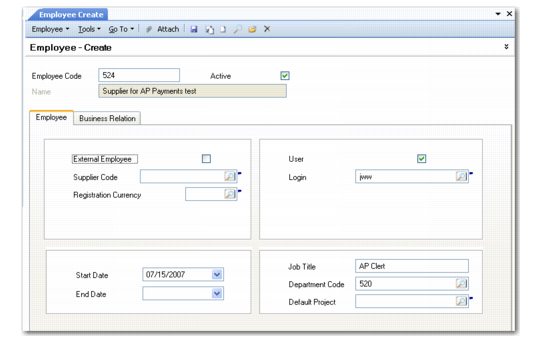
Employee Create
Field Descriptions
Employee Code
Specify a code (maximum eight characters) that identifies an employee. The code cannot match any other employee in the current entity or any other entities in the current domain. The employee is associated with the entity that is active in your current session.
If you leave the Employee Code field blank, the system automatically generates a number for the record based on the sequence defined in Employee Autonumber Create. See
Autonumbering Sequences.
Name
This field displays a value only after you select a business relation code to associate with this employee in the Business Relation tab. Address and contact details come from the headoffice address type of the business relation, including the value for name. After you have created an employee, you cannot modify the associated business relation.
Active
Indicate if this is an active record.
External Employee
Select this field if the employee is a contractor or not employed directly by your organization.
Supplier Code
Specify a supplier code to associate with this employee for the payment of expense claims.
Registration Currency
Specify the currency that should be used when expenses for this employee are paid. This field is available only when a supplier code is specified.
Start Date
Specify the date this employee was hired. This field is for reference and filtering report data.
End Date
Specify the date when this employee terminated employment at your company. This field is for reference and filtering report data. Generally, when you enter an end date, you should also clear the Active field to indicate that this employee is no longer active.
User
Indicate if this employee is also defined as a valid user in User Maintenance (36.3.1).
Login
If this employee is also a user, enter the associated login ID specified in User Maintenance. This field is available only when the User field is selected.
Job Title
Enter an optional job title for this employee. This field is for reference only and useful in sorting browses. Job titles can also be useful on shop floor reports.
Department Code
Specify the department in which this employee normally works.
Department codes, defined in Department Maintenance (14.1), identify major groupings of manufacturing work centers, at your own site or at sites belonging to outside suppliers.
Employees are not restricted to reporting labor at only work centers in their own department. This field is a default useful for reviewing employees by department.
Default Project Code
Optionally enter a code identifying the GL project normally assigned to this employee.
The employee project defaults in Shop Floor Control functions when non-productive labor is reported. It can be changed manually as needed.
If this employee is defined as a service engineer in the Service/Support Management module, the default project is also used when expenses are recorded for a call in Call Activity Recording (11.1.1.13). In this context, the service expense is considered a form of non-productive labor.