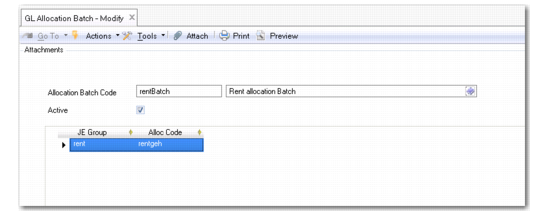
Defining Allocation Batches
Use GL Allocation Batch Create to define batches of allocations that you can then run using GL Allocation Batch Run Execute (25.13.9) to run multiple allocations simultaneously. This activity also runs allocations in sequence, using the result of one allocation as the source of the next. An allocation batch can contain one or multiple allocation codes.
GL Allocation Batch Modify
Field Descriptions
Allocation Batch Code
Enter a code (maximum 20 characters) that identifies the allocation batch.
Description
Enter a brief description (maximum 40 characters) of the allocation batch.
Active
Indicate if this is an active record.
JE Group
Enter a code to identify the journal entry (JE) group.
JE groups are transaction groups that contain allocations.
The system runs all of the allocations in the JE group. This ensures that when an allocation batch run is interrupted, the system does not stop the batch run until all allocations in the current group have been run.
You must assign the same daybook to all allocations in a JE group. The result of a JE group run is always a single journal entry.
Alloc Code
Specify an allocation code to include in the JE group.
See
Financial Allocations for information on how to set up allocations.
Last Modified Date/Time and User
These read-only fields are maintained by the system, and display the ID of the user who last updated this record and the date and time of update.