Financial Allocations
Allocation is the process of distributing costs and revenues to the appropriate accounts, sub-accounts, cost centers, and projects. Use the GL Allocation activities (25.3.22) to identify types of cost and automatically distribute them to the correct cost targets.
Configure allocations using the following sequence of steps:
• Define the allocation structure. Allocation structures consist of a source, a target, and the transfer algorithm between them.
• Group allocations into batches.
• Configure recursive allocations to reuse a previous allocation run as input for the next.
• Interrupt and restart the execution of a batch.
• Validate the results of the allocation run before final posting.
Cost Types
The allocation function recognizes direct and indirect types of cost.
A direct cost can be traced directly to the source. For example, when a department purchases office furniture for its own use, the cost is a direct cost. Direct costs can be further subdivided into:
• Assignable costs are charged directly to the account or sub-account without allocation.
• Shared costs cannot be directly assigned to a cost objective, but are charged instead to an intermediate cost pool.
An indirect cost cannot be traced directly to one source. For example, a company electricity bill covers the electricity usage for all company departments. Initially the bill is allocated to an overhead cost center, and later re-allocated over all the departments. You use allocation to distribute indirect costs to the various direct activities that benefited. For this, you must define a cost allocation plan.
Cost Allocation
The cost allocation process has three steps:
1 Classify Costs. Cost classification is the process of labeling direct and indirect costs relative to the cost allocation process.
2 Pool Costs. Cost pooling is the process of accumulating costs into pools for allocation. You must pool similar allocatable costs, which you can then combine to simplify the allocation process.
Cost items can be individually allocated or all cost items in the pool can be totaled and the total allocated. The decision depends on the reporting requirements and the level of budget control.
3 Allocation. You can allocate a cost if the goods or services involved are chargeable or assignable to a cost objective in accordance with relative benefits received. This measure of benefit is used to define the allocation algorithm.
Allocation Structure
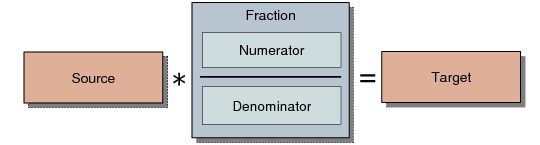
An allocation consists of the following elements:
Source
This is the base amount for the allocation.
Fraction
This is a factor applied to the source amount to calculate the amount to be posted to the target.
Target
This consists of the COA elements, such as account, sub-account, cost center, project, or SAF, to which the fraction is to be posted.
Note: You can post allocations to both system and user-defined SAFs.
Allocation Structure
Allocation Sources
Constant Value
The source is a value that is entered in the allocation definition, but which can still be changed during execution of the allocation batch. The value can be entered in the base currency or as a combination of base currency and quantity.
Standard Charge
Standard charges are calculated as the multiplication of a quantity and a unit price. Both values are entered in the allocation definition, but can still be changed when the allocation is executed. The per-unit cost for electricity is an example of a standard cost.
WBS Topic
Work Breakdown Structure (WBS) topics are used in budgets to provide analysis for budget costs, and are also used in allocations as a source type. WBS topics are combinations of COA elements, such as GL accounts, cost centers, projects, or SAFs.
The allocation source is calculated as the total of all postings on all the COA elements. The budget daemon calculates the values posted on all WBS topics and maintains up-to-date values before an allocation run. When using WBS topics as source, you can select whether to apply the balance, debit value, or credit value.
Important: If you disable the Budgeting module in System Maintain (36.24.3.1), you also disable to ability to create allocation transactions based on WBS topics.
Example: The WBS topic Housing Cost is defined in a budget and linked to the GL accounts 610100, 610200, 610300. The total of postings on those accounts is used to calculate the source value.
For more information on budgeting and WBS topics, see
Setting Up Budgets.
Fractions
Constant Factor
The fraction can be a constant multiplier that is entered in the allocation definition and which can also be reviewed and changed during the execution of the allocation batch.
Real Fraction
The fraction can be a real fraction defined by its numerator and denominator. Both the numerator and denominator are WBS topics from which the value or quantity is retrieved.
When the allocation is run, the source value is multiplied by the constant value and the real fraction.
Proportional Fraction
A proportional fraction uses multiple fractions. Only the denominator is specified to calculate the fractions. The denominator is a WBS topic.
The numerators are implicitly defined based on the denominator. There are as many numerators (and, thus, fractions) as composing elements in the denominator.
Allocation Targets
You must define a posting template to specify how the amounts calculated by applying the fractions to the source amounts are to be posted.
Creating GL Allocations
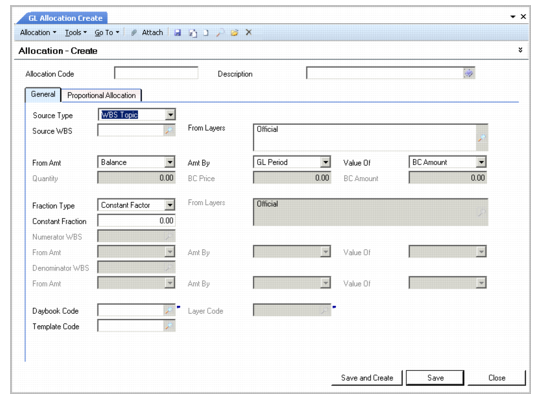
Use GL Allocation Create to set up your allocation structure.
GL Allocation Create
Field Descriptions
Source Type
Select an allocation source type from the following:
Constant Value: The source is a constant value that can be modified before executing the allocation batch. The value can be entered as a base currency amount, or as a base currency amount with a quantity.
Standard Charge: The source amount is calculated as the multiplication of a quantity and a unit price. Both values are entered in the allocation definition, but can be modified before executing the allocation batch.
WBS Topic: The source amount is calculated by totaling the postings of the COA elements that comprise the topic.
Source WBS
This field is available when you select WBS topic as the source type. Specify a WBS topic from a Budget definition that has the Used for Allocation field selected. If this field is not selected when the topic is defined, it cannot be used in the allocation definition.
You do not need to enter budget data at this stage. The Allocation function uses only the WBS structure and the COA links. See
Budgeting.
From Layers
This field is available when you select WBS topic as the source type. Select the layer from which postings should be taken to calculate the source amount for the allocation.
From Amt
This field is available when you select a WBS topic as the source type. Select from Balance, Credit, or Debit.
This field determines whether only credit activity, debit activity, or both (the balance) are used to calculate the source amount.
Amt By
This field is available when you select WBS Topic as the source type. Specify the time period taken into account when the posting totals are calculated.
• Select GL Period to specify the period entered at the moment of the allocation run.
• Select YTD to specify the period from the start of the accounting year to the current date.
Value Of
This field is available when you select WBS topic as the source type. Select from the following drop-down options:
Both: A base currency amount and a quantity are taken from the source and are allocated to the target.
BC Amount: Only a base currency amount is taken from the source and allocated to the target. The target posting does not include quantity fields.
Quantity: The target receives a base currency amount that is calculated by multiplying the source quantity by the fraction. The target posting does not include quantity fields.
Quantity
This field displays the quantity value when you use a Constant Value or Standard Charge source type. This field is unavailable if the Source Type field is set to WBS Topic.
BC Price
This field is available when you select Standard Charge as the source type. Specify a price in base currency.
BC Amount
Specify a base currency amount to be allocated. This field is available only when you select Constant Value as the source type.
When the source type is Standard Charge, this field displays the calculation of quantity multiplied by base currency price.
Fraction Type
Select a fraction type from the drop-down list:
Constant Faction: The fraction is a constant that you specify in the Constant Fraction field.
Real Fraction: Specify a numerator and denominator.
Proportional Fraction: Only the denominator has to be specified. The numerators are derived from the denominator definition.
Numerator WBS, From Amt, Amt By, Value Of
Use these fields to define the fraction numerator. The fields are available only when you select a fraction of type Real Fraction.
Denominator WBS, From Amt, Amt By, Value Of
Use these fields to define the fraction denominator. The fields are available only when you select a Real or Proportional Fraction.
Daybook Code
Specify a daybook for the allocation posting.
Layer Code
This field displays the layer to which the daybook is assigned.
Template Code
Specify a daybook template for the target posting. For constant factor and real fractions, the template also defines how the amount to be posted is prorated over the different posting lines of the template.
In the following example of a housing allocation cost, the amount to be posted is prorated as:
Administration: 30%
Management: 20%
EDP: 30%
Sales: 20%
The Proportional Allocation tab displays the calculated amounts. This tab contains additional data for the allocation engine when calculating the proportional fractions.
The journal entry for this allocation then displays the final prorated amounts.