Mass Layer Transfer for Periodic Costing
Use Mass Layer PC-Transfer Execute (25.13.12) to transfer batches of unfinalized periodic costing calculations from the transient layer to the management or official layers. You can only use this function to transfer postings in daybooks of type Periodic Costing. Mass Layer PC-Transfer Execute runs at domain level so that you can also use it to transfer periodic costing cross-company postings.
Important: You can only use Mass Layer PC-Transfer Execute (25.13.12) to transfer periodic costing postings. To transfer regular, non-periodic costing postings, use Mass Layer Transfer Execute (25.13.11).
When you click the Add button, the system populates the grid in the Mass Layer Transfer screen with postings that match the selection criteria. From this list, you can choose which postings to include in the transfer by selecting or clearing the Select field for that posting.
The daybook to transfer from must be of type Periodic Costing and must be linked to the transient layer. The system displays a warning if any of the selected transactions are cross-company postings that still have corresponding postings in a transient layer. This provision helps to keep cross-company postings synchronized in both entities. Mass Layer PC-Transfer Execute only transfers one side of the cross-company posting. You must manually transfer the corresponding posting in the other entity to the management layer.
All selected postings are transferred to the same target daybook, which can be linked to the official layer, a management layer, or another transient layer. However, the target daybook must also have a daybook type of Periodic Costing.
Note: Mass Layer PC-Transfer Execute displays a message if there are open pending invoices for the period.
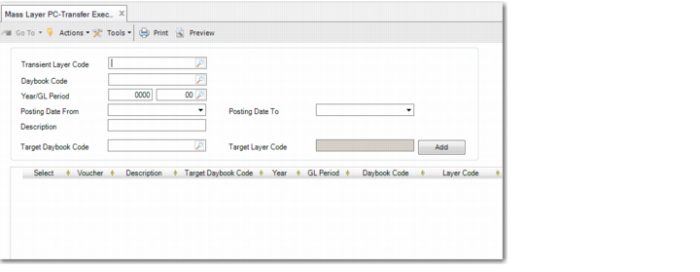
Mass Layer PC-Transfer Execute
Transient Layer Code
Specify the transient layer from which you want to transfer unfinalized periodic costing postings.
Daybook Code
Specify the transient layer daybook from which to transfer unfinalized periodic costing postings.
Year/GL Period
Specify the GL period from which postings are to be transferred. This field is mandatory.
Posting Date From
Specify the first date in a range to search for postings to transfer.
Posting Date To
Specify the last posting date in the range to search for postings to transfer.
Description
Enter a brief description (maximum 40 characters) of the postings to be transferred.
Target Daybook Code
Select the daybook to which to transfer the postings. The target daybook must be a Periodic Costing daybook.
Target Layer Code
This field displays the layer associated with the daybook to which to transfer the postings.
Click Add to retrieve journal entries that match the criteria.
The grid field explanations are the same as for Mass Layer Transfer Execute.
Click Transfer to begin the transfer of your selected postings to the target layer.
Note: A progress indicator shows the status of the transfer. Once started, you cannot cancel the transfer.