Mirror Accounting
Mirror accounting is used in several European accounting systems to ensure that inventory transactions are reflected immediately in the income statement, as well as in the balance sheet. This lets you analyze purchases and inventory movement in the GL in internal management reports.
You can apply mirror accounting to inventory control transactions only, such as PO Receipts, WO receipts, inventory movements, and SO shipments.
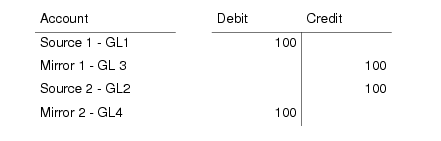
Mirror accounting links a set of source (balance sheet) accounts to a set of mirror (income statement) accounts. When an inventory transaction is posted that updates the source accounts, the system generates a mirror posting that updates the mirror accounts simultaneously:
Mirroring adds two posting lines to the original transaction, which update the mirror accounts you defined.
You can select the following types of source account:
• Standard account
• Cross Company Control account
• Inventory Control account
• WIP Control account
• System accounts of type Purchase Order Receipts and Unmatched Invoices.
All mirror accounts must be standard GL accounts.
When your source account is a cross-company account, the cross-company mirror transactions are posted as usual across the entities.
Inventory transactions normally use operational daybooks in the official layer only. When mirror accounting is enabled, you can choose to post both source and mirror transactions to daybooks in either the official or management layer, and can also select either journal entry or matching as the daybook type. This lets you generate mirror transactions in different layers for reporting purposes.
A mirror transaction can optionally be split into two sub-transactions, which can be posted to either the source or mirror daybooks. See
Splitting Mirror Transactions.
You typically select balance accounts as source accounts and P&L accounts as mirror accounts, and define daybooks and split transactions as required.
Mirror accounting is also affected by two other options:
• When Summarized Journal is set to Yes in Inventory Accounting Control (36.9.2), operational transactions are summarized before they are posted. In this case, the mirroring information on individual transactions is executed but the split transactions are summarized, and the individual split transactions are not displayed in subsequent reports.
Note: When Summarized Journal is selected and transactions contain legal document numbers, not all legal document numbers are tracked in the summarized inventory transactions. Therefore, when legal documents are used to track inventory transactions, it is recommended not to select the Summarized Journal field.
• When Create GL Transactions is set to No in Inventory Accounting Control, the system does not generate IC transactions, and mirror accounting is disabled.