Defining Source and Mirror Accounts
Use Mirroring GL Account (3.20.7.1) to create, modify, delete, and view mirror account configurations. Use this function also to define mirroring analysis and transaction splitting options.
Note: When you define two mirror accounts with differing consolidation methods, the system displays a warning, but does not prevent the mirroring from taking place.
Splitting Mirror Transactions
When you split mirror transactions, you define the daybooks into which the transactions are to be posted. You can split mirror transactions into sub-transactions in two ways:
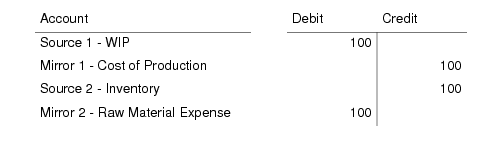
• Mixed. The sub-transactions use the source accounts with their paired mirror accounts:
• Separate. The sub-transactions use a mix of source and mirror accounts:
When splitting transactions, you must specify the daybook in which each split transaction is to be posted. You must post at least one transaction in the source daybook.
Mirror Account Analysis
Mirror accounting handles account analysis in the following way:
• When both the source and mirror accounts have the same type of analysis (sub-account, cost center, or project), but no values are defined for the mirror account, the system uses the source account value in the transaction.
• If a value is defined for the mirror account, the system uses that value in the transaction.
• If analysis is defined for the mirror account but not for the source account, the system retrieves a default value for the analysis from the mirror account definition.
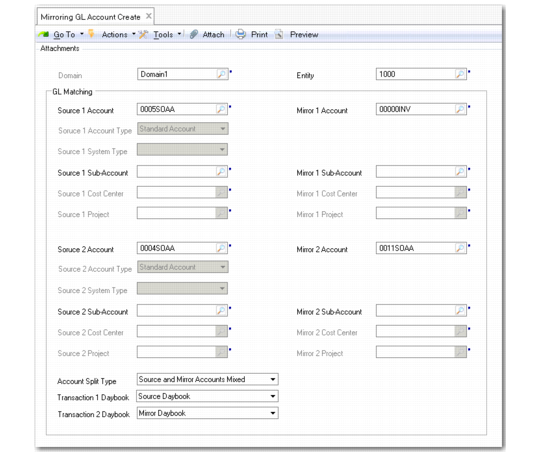
Mirroring GL Account Create
Field Descriptions
Source 1 Account
Specify the first source account.
Source 1 Account Type
This field displays the source account type.
Source 1 System Type
When the source account is a system account, this field displays the system type.
Source 1 Sub-Account
Specify a sub-account for account analysis.
Source 1 Cost Center
Specify a cost center for account analysis.
Source 1 Project
Specify a project for account analysis.
Mirror 1 Account
Specify a mirror account for the source account.
Mirror 1 Sub-Account
Specify a sub-account for mirror account analysis.
Mirror 1 Cost Center
Specify a cost center for mirror account analysis.
Mirror 1 Project
Specify a project for mirror account analysis.
Source 2 Account/Mirror 2 Account
Specify the second source and mirror accounts for the transaction.
Account Split Types
Choose a method for splitting transactions:
None. Mirror transactions are not split.
Separated. The mirror transaction is split, and the sub-transactions use separate source and mirror accounts.
Mixed. The mirror transaction is split, and the sub-transactions use a mix of source and mirror accounts.
Transaction 1 Daybook
Specify the daybook for the first split transaction.
Transaction 2 Daybook
Specify the daybook for the second split transaction.
Example: In this example, mirror accounting is applied to a work order transaction to reflect inventory movement in the income statement as well as the balance sheet. By applying a split to the mirror transaction, you ensure that the inventory transaction is posted to the management layer for analysis, while the mirror transaction is posted to the official layer.
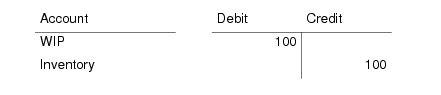
A quantity of 10 items with a standard cost of $10 per item is issued to WIP from Inventory as a work order. This generates the following posting:
Use the following steps to create a mirrored transaction with a separated split:
1 Define a source daybook in the management layer and a mirror daybook in the official layer.
2 Define the following mirroring accounts:
3 Define a split of type Source and Mirror Accounts Separated.
4 Select the source daybook (management layer) for Transaction 1, and the mirror layer (official layer) for Transaction 2.
5 Post the transaction.
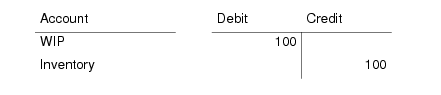
The posting generates the following split transactions:
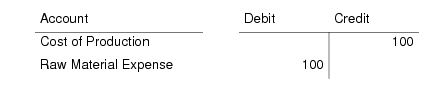
• Transaction 1 to the management layer:
• Transaction 2 to the official layer:
Mirror Accounting Report
The Mirror Accounting Report (25.15.1.16) displays the source and mirror postings for a selection of source accounts and source daybooks. The report identifies the source and mirror posting lines and daybooks both for split and non-split transactions.