Supplier Activity Dashboard
The AP module includes many additional reports and views that let you review supplier information using customizable selection criteria. These are discussed in
Accounts Payable Reports.
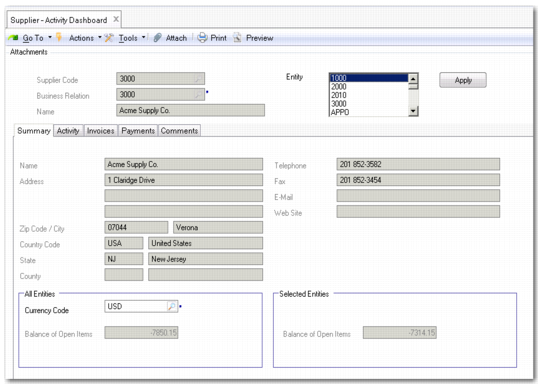
The Supplier Activity Dashboard (28.18.1) offers a comprehensive overview of all activity related to a single supplier, in a single entity or over multiple entities. The drill-down generates read-only information that includes invoices, credit notes, and payments.
You can select open or closed payments and display individual payment details, as well as total amounts for each selection you make. You can filter by currency.
The Activity tab displays all invoices and associated payments for the supplier, by default for a three-month period. Payments display as child rows beneath their associated invoices. You can view the invoice and payment information separately using the Invoices and Payments tabs. Amounts in the payment and invoice grids are displayed to two decimal places, and discount calculations support negative quantities.
You can use grid features to group and sort information by key credit-related details such as the number of weeks overdue, or see all invoices due in a certain week.
Supplier Activity Dashboard
Field Description
Supplier Code
This field displays the code of the supplier you selected in the supplier browse.
Business Relation
This field displays the supplier business relation code and business relation name.
Entity
Select one or multiple entities for which to display AP activity for this supplier. The current entity is selected by default, and totals for the current entity display in the Summary tab. Use Ctrl+Click to select multiple entities in the list.
Currency Code
Specify a currency in which to display the information. The supplier currency is loaded by default. When you specify a different display currency, amounts are converted from the supplier currency using the default accounting exchange rate. For example, switch currencies to view the amounts in the currency of the current domain.
Note: When you switch currencies, the system uses the Accounting exchange rate effective as of today.
Balance of Open Items
This field displays the total amount of supplier open items generated in all entities. Open items consist of invoices and credit notes entered directly using Supplier Invoice Create and posted invoices and credit notes from operational activity.
Balance of Open Items (Selected Entity)
This field displays the total amount of supplier open items in the selected entity.