Running Year-End Closing
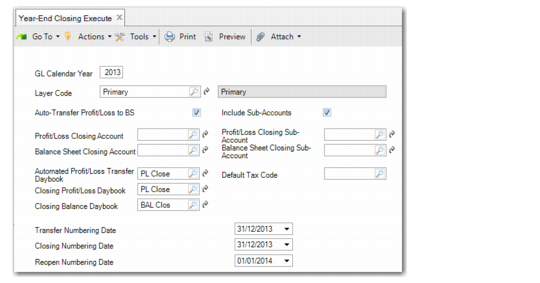
When you have completed the setup, run Year-End Closing Execute (25.21.4.1).
When Additional GL Numbering is enabled, you can specify numbering dates for year-end closing postings. See
Additional GL Numbering for more information.
Year-End Closing Execute
Field Descriptions
GL Calendar Year
Specify the GL calendar year for which you want to run the year-end closing process.
Layer Code
Specify the layer code of the layer you want to close. Only the official and management layers are available for selection. By default, the field displays the official layer code. Changing this field also changes the values in the daybook fields.
Auto-Transfer Profit/Loss to BS
Select the field to automatically transfer the profit and loss to the balance sheet during the year-end closing process.
If you clear the field, the year-end closing process assumes that you have transferred the profit and loss manually.
Note: If you do not transfer the profit and loss to the balance sheet either manually or automatically, the sum of the profit and loss accounts will not be zero and you cannot register the year-end closing.
Include Sub-Accounts
Select the field to close sub-accounts during year-end closing.
If you clear the field, the year-end closing process does not include sub-accounts in the postings.
Profit/Loss Closing Account
Specify the profit and loss GL account to which the year-end closing procedure posts the total balance of the profit and loss accounts. The account must be a profit and loss GL account defined without sub-accounts and analysis.
The year-end closing process uses this account only when you select the Auto-Transfer Profit/Loss to BS field.
Balance Sheet Closing Account
Specify the balance sheet GL account to which the total balance of the profit and loss accounts will be transferred. The account must not include sub-accounts.
The year-end closing process uses this account only when you select the Auto-Transfer Profit/Loss to BS field.
Automated Profit/Loss Transfer Daybook
Specify the daybook to use for the posting that transfers the total balance on the profit and loss accounts to the balance sheet. When you change the layer to close, the daybook in this field automatically changes. When only one daybook exists, it defaults to that daybook. When multiple daybooks exist, it defaults to the daybook used to close a year previously. Otherwise, the field is blank.
The daybook must be of type Year-End Closing.
This daybook is required only if you have selected the Auto-Transfer Profit/Loss to BS field.
Closing Profit/Loss Daybook
Specify the daybook to use for the posting in which the individual profit and loss accounts are set to zero. When you change the layer to close, the daybook in this field automatically changes. When only one daybook exists, it defaults to that daybook. When multiple daybooks exist, it defaults to the daybook used to close a year previously. Otherwise, the field is blank.
The daybook must be of type Year-End Closing.
Closing Balance Daybook
Specify the daybook to use for the postings in which the individual balance sheet postings are closed and re-opened. When you change the layer to close, the daybook in this field automatically changes. When only one daybook exists, it defaults to that daybook. When multiple daybooks exist, it defaults to the daybook used to close a year previously. Otherwise, the field is blank.
The daybook must be of type Year-End Closing.
Profit/Loss Closing Sub-Account
Specify the profit and loss GL account to which the year-end closing process posts the total balance of profit and loss accounts that include sub-accounts.
The year-end closing process uses this account only when you select the Auto-Transfer Profit/Loss to BS field.
This field is unavailable if the Include Sub-Accounts field is cleared.
Balance Sheet Closing Sub-Account
Specify the balance sheet GL account to which the year-end closing process transfers the total balance of the profit and loss accounts with sub-accounts.
This account is required only when the Auto-Transfer Profit/Loss to BS field is selected.
This field is unavailable if the Include Sub-Accounts field is cleared.
Default Tax Code
Specify the default tax code to associate with the year-end closing transactions. This rate is required to make the closing postings for tax accounts. While the amount of the posting is zero, the rate is required to create a valid record.
Transfer Numbering Date
When using additional GL numbering, you can specify a numbering date for the system-generated posting that transfers the profit and loss to the balance sheet. This numbering date is optional, and the Transfer Numbering Date field is only available when you select the Auto Transfer Profit/Loss to BS field.
Closing Numbering Date
When using additional GL numbering, you must specify a numbering date for the profit and loss and balance sheet closing posting. This field is mandatory, and its default value is the system date.
Reopen Numbering Date
When using additional GL numbering, you must specify a numbering date for the balance sheet reopening posting. This field is mandatory, and its default value is the system date.