Maintaining Segregation of Duties Policy Exceptions
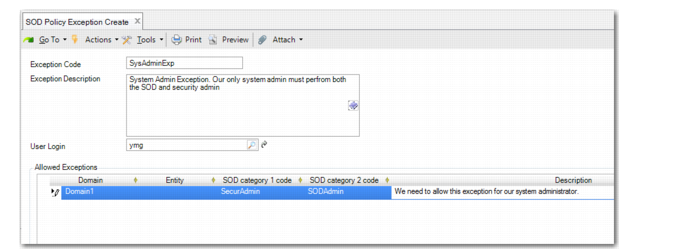
Use SOD Policy Exception Create (36.3.27.2.1) to maintain segregation of duties policy exceptions. Defining a policy exception gives a specified user access to a pair of resources that are not compatible under segregation of duties policy.
Segregation of duties policy exceptions are sometimes necessary to accommodate situations—for example, unforeseen absences in the workplace—that require a user to perform tasks outside of their usual responsibilities.
Note: Although the system does not constrain the number of segregation of duties policy exceptions that can be defined, if it becomes apparent that many policy exceptions are required, this may indicate that your segregation of duties security model should be reviewed. Policy exceptions are intended to accommodate exceptional circumstances, rather than systemic inadequacies in a segregation of duties policy framework.
A policy exception is associated with a domain and, optionally, an entity within a domain. If an entity is not specified, the policy exception applies to all entities within the specified domain.
Policies are checked any time a change is made that impacts segregation of duties; for example, when a user is assigned to a role, when you link resources to categories, when you change role permissions, or when you change role membership.
When you add a user to a role, the system validates that the roles the user already belongs to are compatible with the new role assigned. If they are not compatible, the system searches for a policy exception for this user. If no exception is found, an error is generated and the user cannot be added to the role.
Example: The MediCare company wants to implement segregation of duties. Normally, for good internal control, the user who implements and maintains system security should be different than the user who implements segregation of duties. However, MediCare is a small company with a small IT department and one system administrator. Therefore, the system administrator is assigned both the roles for Security Maintenance and SOD Maintenance.
Policy exceptions display in the SOD Violations Report (36.3.27.9).
SOD Policy Exception Create (36.3.27.2.1)
Exception Code
Enter a policy exception code.
Exception Description
Enter a description of the policy exception.
This field describes the business reason underlying this policy exception and may be required for auditing purposes. You can include information about compensating controls (that is, management controls that are outside the system) that your organization uses to mitigate risks arising from the exception.
User Login
Enter a user ID to identify the user to whom this policy exception applies.
SOD Policy Exception Create, Category Details
Domain
Specify the domain in which this policy exception applies.
Entity
Specify the entity in which this policy exception applies for the specified user. If no entity is entered, the policy exception applies to all entities within the domain.
SOD Category Code 1
Specify the first category in the pair for which this exception applies.
SOD Category Code 2
Specify the second category in the pair for which this exception applies. If you have specified the first category and that category is defined as being incompatible with only one other segregation of duties category, the second segregation of duties category defaults automatically.
Description
Enter a detailed description of why the policy exception is required for the segregation of duties categories. This field is optional.
After you have defined segregation of duties policy exceptions, use Role Membership Maintain (36.3.6.6) to associate users with the user roles that have been defined as part of your segregation of duties policy exceptions. See
Defining Role Membership.