Defining Role Membership
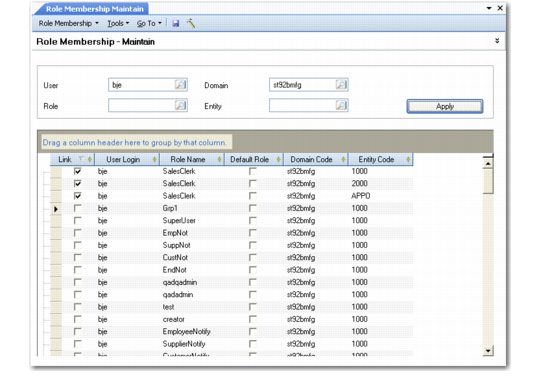
Use Role Membership Maintain (36.3.6.6) to define an association between a role defined in the system and a system user and to indicate which role is the user’s default role. The default role does not affect security, but is used to determine role-specific customizations and stored searches. See
Default Roles for details.
The screen presents a workbench-type interface where you can select records to update by user, role, domain, and entity.
Note: Although you can leave all fields blank when generating a list, this is not recommended since the list may take a long time to display, depending on the number of records in the database.
Role membership is always qualified by domain and entity. This is true even though for most operational functions, the specific entity is not relevant. To execute these operational functions, a user must still belong to a role that has access to at least one entity—typically the primary entity—in the domain.
Specifying role membership defines both who belongs to the role and the role context; that is, which domains and entities the role can access.
When a user logs in, the system builds the menu for that user by combining:
• All standard functions belonging to all roles assigned to the user in any entity of the selected domain
• All component activities belonging to all roles assigned to the user in the selected entity
Example: Domain A has entities located in California, New York, and London. Carol has been assigned the role HR Manager for all three entities. Tom has been assigned the same role, but only for London; Pam and Tom share responsibilities for London. Pam’s role membership is specified for entities California, New York, and London. Tom’s role membership, however, is defined for the London entity only.
Role Membership Maintain (36.3.6.6)
Use the User, Role, Domain, and Entity fields at the top of the screen to select the records you want to work with during this session. You can group the data in the grid or sort or rearrange columns to streamline the setup activity. Selecting the check box indicates that the user has access to the role for the associated domain and entity.
Note: Any changes to a user’s domain or entity access privileges also automatically update that user’s role membership information. For example, removing a user’s ability to access an entity breaks the association between that entity and the user’s assigned role, and the entity is deleted from the list of assigned entities in Role Membership Maintain. For details on defining user access to domains and entities, see
Specifying Access to Domains and Entities.