Controlling Inventory Updates
The system has two ways to control inventory updates within a domain. Updates can be controlled by:
• Sites within a domain
• Specific combinations of inventory-related fields such as item number and location
Note: If you are using the optional QAD Warehousing module, you can also assign security by warehouse using Warehouse Security Maintenance (4.23.13).
Access by Site
Site security lets administrators control user access to inventory transactions at each site in a domain. Only authorized users can process transactions at secured sites.
Note: By default, users have access to all sites unless security has been defined in this program.
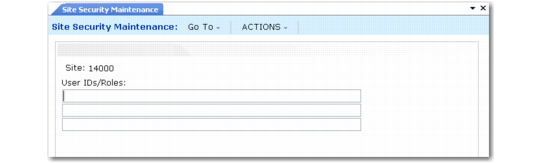
Access is managed by user and role. A user can access a site only if that user’s ID or role is specified in the User IDs/Roles field in Site Security Maintenance (36.3.13.8). Use Site Security Report (36.3.13.9) to view site security defined for system users.
Site Security Maintenance (36.3.13.8)
When a user enters a restricted site code in a site-controlled program, the system checks the value of the User IDs/Roles field associated with the site in Site Security Maintenance. If the user does not belong to an appropriate role, or if the user is not given specific access by user ID, an error message displays and the user cannot complete the transaction.
Programs Affected
• Site security works with programs that change inventory data and have a Site field as part of the selection criteria.
• Site security checks ranges of sites on batch update programs that meet the previous criteria: they affect inventory and have a Site field. This includes programs such as Regenerate Materials Plan (23.2) and Sales Order Auto Allocations (7.1.17).
• Site security does not affect inquiry and report programs.
• Delete and archive programs, Contract Control (11.5.24), and Quality Management Control (19.24) do not use site security.
• You must set up each domain individually.
Implementing Site Security
It is important to plan site security carefully and to follow closely the procedures for creating roles, users, and associations between users and roles. After you have created any site security records, users who are not listed individually or who have not been assigned access privileges in Site Security Maintenance (36.3.13.8) cannot complete transactions at secured sites.
Ranges of Sites
Many programs let you access a range of sites at one time. Site security controls data updates and processes for ranges of sites. If you enter a range of sites, you must have access to all of them for the update to occur.
When you enter a range of sites that includes sites you do not have access to, an error message displays for the first site code from which you are restricted. You must then adjust the site range to include only sites that you can access.
Update Restrictions
You can use Site Security Maintenance to specify which roles are allowed to update inventory at particular sites within a domain. This type of security is discussed in the section
Access by Site.
However, when stringent internal controls for regulatory reporting exist, you may need to control who can update inventory at a more detailed level than the site. For example, you might need to allow only certain roles to transfer inventory out of a Quarantine location, or restrict certain roles from making specific inventory status code changes within a site.
You can use the programs on the Update Restrictions Menu to implement stricter control over inventory movements and status updates that are completed throughout the system. Each particular update restriction program affects a set of programs where inventory transactions occur. Grouping the transactions this way lets you focus control on the areas that are critical to your business practices.
The specific combination of fields that you use to manage inventory depends on the particular program that supports the update restriction, but can include item number, site, location, inventory status code, and the GL account affected by the transaction.
Using the features of Update Restrictions, you can:
• Authorize a role to maintain records, create transactions, or change inventory status for specific item, site, and location combinations in a set of programs that create transactions.
• Restrict a role from maintaining records, creating transactions, or changing inventory status for specific item, site, and location combinations in certain system programs.
• Generate a report of all defined update restrictions.
You should define update restrictions as part of a general security model, which includes defining roles for your organization, as well as setting up any required site and field security. The system applies site and field security before update restrictions.
Note: The descriptions of the programs in this section only discuss fields that are unique to that program. The item, number, site, and location fields operate identically in each program.
Setting Up Update Restrictions
You can set up update restrictions for the following types of functions.
General Rules for Update Restrictions describes the common logic used in all of the functions to determine whether restrictions apply to a user’s role.
Update restrictions only apply to the domain where they are defined. If no restrictions are defined, all roles with access to these programs can perform data updates, as long as they also have access to the site being updated.
Using Wild Cards for Update Restrictions
You can enter item number, site, location, and status values using wild cards. Use the asterisk (*) and exclamation point (!) as inclusion and exclusion wild cards respectively:
• * indicates access to all.
• string* indicates access to all beginning with string.
• string indicates access to that string only.
• !string* indicates access is restricted from all beginning with that string.
• !string indicates access is restricted from that string only.
Use combinations of inclusive and exclusive restrictions to specify both large and small sets of value combinations.
General Rules for Update Restrictions
1 If one restriction is set up, all transactions are validated and have to pass to be accepted. If no restrictions are set up, all transactions are accepted.
Example: As soon as a restriction is set up in Inventory Restriction Detail Maint (36.3.7.2), then Inventory Detail Maintenance (3.1.1) is secured for all transactions.
2 Defining a record in one of the restriction setup programs only affects the programs covered by this restriction. For example, defining a restriction in Inventory Restriction Detail Maint has no effect on Sales Order Maintenance because Sales Order Maintenance restrictions are specified in SO Restrictions Maintenance (36.3.7.8).
3 The values from the transaction are matched against the restrictions defined. There has to be one positive match for the transaction to be accepted.
4 If there is more than one match, all must be positive matches for the transaction to be accepted. In other words, the first negative match will make the transaction fail.
5 There is an implied hierarchy within the fields used to set up the restrictions (Item, Site, Location, and so on). The hierarchy is the order in which they appear on the screen where the restrictions are set up. If a transaction matches a field value that is excluded for a role—for example, Site: !10000—the system fails the transaction without considering the values of the fields lower in the setup screen.
6 These rules are the same for all transactions that are enabled for this functionality. The fields may be different from one transaction to another, but the above rules still apply.
Examples of Update Restrictions
The examples in this section relate to Inventory Transfer Restriction Maintenance. However, as the programs on the Update Restrictions Menu all operate in a similar manner, these examples are relevant to the other Update Restrictions programs.
Example: For the specified role, one restriction is defined for a combination of values:
Role (Stock), Item (22-100), From Site (10000), To Site (11000), From Location (100), To Location (200), From Status (20), To Status (20)
Only users with the Stock role can create transactions for this combination of values. This role cannot create transactions for any other combinations; no other role can create transactions for any combinations at all.
Example: For the specified role, restrictions are defined for multiple items:
Item (22-1*), From and To Site (10000), From and To Location (100), From and To Status (*)
Item (22-2*), From and To Site (11000), From Location (100), To Location (200), From and To Status (*)
With these restrictions defined, only the specified role can create transactions for items with any status where:
From and To Site is 10000, From and To Location is 100, and item numbers begin with 22-1
From and To Site is 11000, From Location is 100, To Location is 200, and item numbers beginning with 22-2
No other role can create transactions for any combinations at all.
Example: When users will be prevented from creating transactions for items with only a few combinations of values, it is best to first define restrictions that allow all changes; then define additional restrictions for the small set of value combinations where changes are prevented.
For each role, set access to all (*) for all items, sites, locations, and statuses; then set the further restrictions:
Item (*), From Site (*), To Site (*), From Location (*), To Location (*), From Status (*), To Status (*)
Item (!22-200*), From Site (10000), To Site (10000), From Location (100), To Location (200), From Status (*), To Status (*)
For each role where these restrictions are defined, they prevent transfers from location 100 to 200 for items that begin with 22-200 in site 10000. Transfers are still allowed for items with all other value combinations.
Inventory Transfer Restriction Maintenance
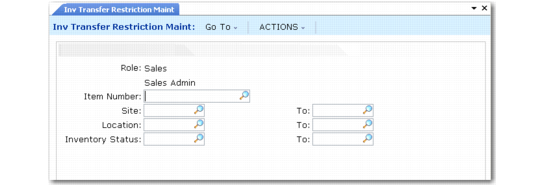
Use Inventory Transfer Restriction Maintenance (36.3.7.1) to specify role-based restrictions on inventory transfers in the following programs:
• Transfer – Single Item (3.4.1)
• Transfer – Multi Item (3.4.2)
• Transfer with Lot/Serial Change (3.4.3)
• Batchload Transfer with Lot/Serial Change (3.4.4)
For each item, restrictions are based on combinations of values for From and To sites, locations, and inventory statuses. All fields are required.
Inventory Transfer Restriction Maintenance (36.3.7.1)
Role
Enter the name of a role defined in your system.
Use roles to streamline security setup. When a new user record is created, you assign the user a role to ensure they have correct access.
Item Number
Enter the code identifying an inventory item defined in Item Master Maintenance (1.4.1).
Item codes uniquely identify items or products. These may be raw materials, purchased or manufactured intermediates, finished items, or packaging materials. Item codes are also used to identify planning items, configured products, repair parts, service items, and kits.
Most reports and inquiries can be selected by item number.
Site
Enter the originating site that is part of the definition for this update restriction.
To
Enter the receipt or receiving site that is part of the definition for this update restriction.
Location
Enter the originating location that is part of the definition for this update restriction.
To
Enter the receipt or receiving location that is part of the definition for this update restriction.
Inventory Status
Enter the original or starting status code that is part of the definition for this inventory restriction.
Restrictions can specify whether this status code can be changed to another specified status code or whether it can be changed at all. This is part of a restriction definition that specifies which roles have access to update specific combinations of items, sites, and locations.
Define status codes in Inventory Status Code Maintenance (1.1.1). Assign inventory status codes to sites with Site Maintenance (1.1.13) and locations with Location Maintenance (1.1.18). Optionally assign default inventory status codes for purchase order or work order receipts to individual items using Item Master Maintenance (1.4.1), Item Inventory Data Maintenance (1.4.5), or Item-Site Inventory Data Maintenance (1.4.16).
To
Enter the destination or target status code that is part of the definition for this inventory restriction.
Inventory Detail Restriction Maintenance
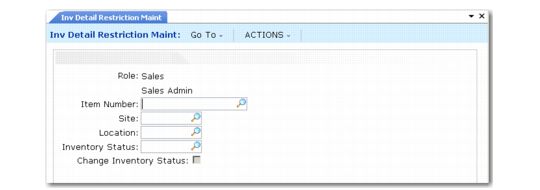
Use Inventory Detail Restriction Maintenance (36.3.7.2) to specify role-based restrictions on updating inventory details in these programs:
• Inventory Detail Maintenance (3.1.1)
• Detail Maintenance by Item/Lot (3.1.2)
Multiple To statuses can be specified for each site, location, and From status combination for an item. Select the Change Inventory Status check box and press Next; this displays the Valid Inventory Status Code frames for maintaining the list of valid To statuses. Enter a status code in the bottom frame and press Next to add it to the list of valid codes.
If the Change Inventory Status is not selected, the system deletes the list of valid To status codes defined for the current role, item, and values combination.
Inventory Detail Restriction Maintenance (36.3.7.2)
Change Inventory Status
Indicate how you want this update restriction to apply to inventory status changes:
Not selected: Users can change other inventory details such as assay percentage and expire date but they cannot change the inventory status.
Selected: Users can modify the inventory status associated with records for the specified combination of item, site, and location as long as they select an inventory status associated with this restriction.
Selecting the check box displays the list of target status codes that are allowed and lets you add or remove codes as required.
Status Code
Enter a status code to add to the list of valid target status codes that the current code can be changed to. The list is part of an update restriction defined for a particular role and combination of item, site, and location.
Unplanned Issue/Receipt Restriction Maintenance
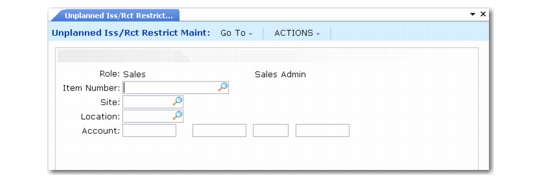
Use Unplanned Issue/Receipt Restriction Maintenance (36.3.7.3) to define role-based restrictions on issues and receipts in these programs:
• Issues–Unplanned (3.7)
• Receipts–Unplanned (3.9)
• Receipts–Sales Order Return (3.10)
• Receipts–Return to Stock (3.11)
• Receipts–Backward Exploded (3.12)
Unplanned Issue/Receipt Restriction Maintenance (36.3.7.3)
Account
Enter a GL account code as part of an issues and receipts update restriction defined for a particular role and combination of item, site, and location.
The account number is used when applying update restrictions to programs such as Issues–Unplanned (3.7) and Receipts–Unplanned (3.9). Define account codes in Account Create (25.3.13.1).
Sub-Account
Enter a GL sub-account code as part of an issues and receipts update restriction defined for a particular role and combination of item, site, and location.
The account number is used when applying update restrictions to programs such as Issues–Unplanned (3.7) and Receipts–Unplanned (3.9). Define sub-accounts in Sub-Account Create (25.3.17.1).
Cost Center
Enter a cost center code as part of an issues and receipts update restriction defined for a particular role and combination of item, site, and location.
The account number is used when applying update restrictions to programs such as Issues–Unplanned (3.7) and Receipts–Unplanned (3.9). Define cost centers in Cost Center Create (25.3.20.1).
Project
Enter a project code as part of an issues and receipts update restriction defined for a particular role and combination of item, site, and location.
The account number is used when applying update restrictions to programs such as Issues–Unplanned (3.7) and Receipts–Unplanned (3.9). Define projects in Project Create (25.3.11.1.1).
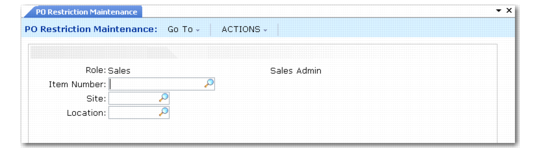
PO Restriction Maintenance
Use PO Restriction Maintenance (36.3.7.5) to specify role-based restrictions on maintaining orders in these programs:
• Build PO from Requisitions (5.2.18)
• Blanket Order Maintenance (5.3.1)
• Blanket Order Release to PO (5.3.6)
• Scheduled Order Maintenance (5.5.1.13)
• Purchase Order Maintenance (5.7)
PO Restriction Maintenance (36.3.7.5)
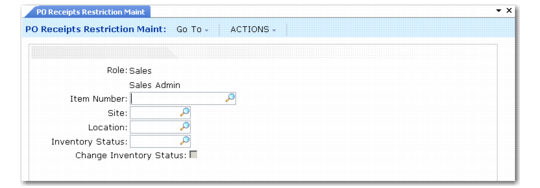
PO Receipts Restriction Maintenance
Use PO Receipts Restriction Maintenance (36.3.7.6) to specify role-based receipt handling and status change restrictions in these programs:
• Purchase Order Receipts (5.13.1)
• Purchase Order Returns (5.13.7)
• PO Shipper Maintenance (5.13.14)
• PO Fiscal Receiving (5.13.16)
• PO Shipper Receipt (5.13.20)
Multiple To statuses can be specified for each site, location, and From status combination for an item. Select the Change Inventory Status check box and press Next; this displays the Valid Inventory Status Code frames for maintaining the valid To status codes. Enter a status code in the bottom frame and press Next to add it to the list of valid codes.
If the Change Inventory Status check box is not selected, the system deletes the list of valid To status codes defined for the current role, item, and value combination.
PO Receipts Restriction Maintenance (36.3.7.6)
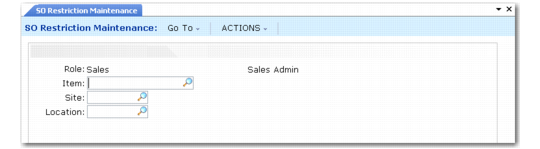
SO Restriction Maintenance
Use SO Restriction Maintenance (36.3.7.8) to specify role-based restrictions on maintaining sales order, invoice, and quote lines in these programs:
• SO Maintenance (7.1.1)
• Scheduled Order Maintenance (7.3.13)
• Pending Invoice Maintenance (7.13.1)
• Sales Quote Maintenance (7.12.1)
• Sales Quote Copy from Order (7.12.5)
• Sales Quote Copy from Quote (7.12.6)
• Sales Quote Release to Order (7.12.10)
SO Restriction Maintenance (36.3.7.8)
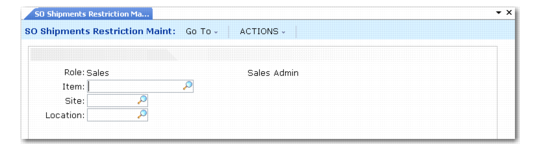
SO Shipments Restriction Maintenance
Use SO Shipments Restriction Maintenance (36.3.7.9) to specify role-based restrictions on creating shipments and maintaining shippers in these programs:
• Picklist/Pre-Shipper – Automatic (7.9.1)
• Pre-Shipper/Shipper Workbench (7.9.2)
• Pre-Shipper/Shipper Confirm (7.9.5)
• Pre-Shipper/Shipper Auto Confirm (7.9.7)
• Sales Order Shipper Maintenance (7.9.8)
• Sales Order Shipments (7.9.15)
• Shipper Unconfirm (7.9.21)
SO Shipments Restriction Maintenance (36.3.7.9)
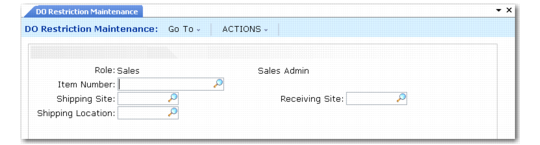
DO Restriction Maintenance
Use DO Restriction Maintenance (36.3.7.13) to specify role-based restrictions on maintaining distribution orders (DOs) in these programs:
• Distribution Order Workbench (12.17.13)
• Distribution Order Maintenance (12.17.14)
• Distribution Order Processing (12.17.21)
DO Restriction Maintenance (36.3.7.13)
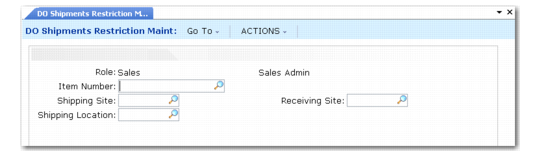
DO Shipments Restriction Maintenance
Use DO Shipments Restrictions Maintenance (36.3.7.14) to specify role-based restrictions on creating shipments in these programs:
• Distributed Order Processing (12.17.21)
• Distributed Order Shipments (12.17.22)
DO Shipments Restriction Maintenance (36.3.7.14)
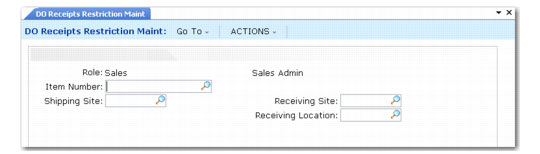
DO Receipts Restriction Maintenance
Use DO Receipts Restriction Maintenance (36.3.7.15) to specify role-based restrictions on creating DO receipts in these programs:
• Intersite Request Maintenance (12.15.1)
• Distributed Order Receipt (12.15.20)
DO Receipts Restriction Maintenance (36.3.7.15)
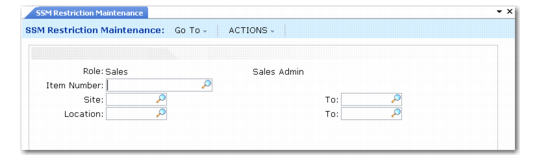
SSM Restriction Maintenance
Use SSM Restriction Maintenance (36.3.7.17) to specify role-based restrictions on maintaining records and creating receipts and shipments for RMAs, RTSs, and MOs in these programs:
• RMA Maintenance (11.7.1.1)
• RMA Receipts (11.7.1.13)
• RMA Shipments (11.7.1.16)
• RTS Maintenance (11.7.3.1)
• RTS Receipts (11.7.3.13)
• RTS Shipments (11.7.3.16)
• Material Order Maintenance (11.11.1)
• Material Order Shipments (11.11.6)
• MO Direct/Pending Returns (11.11.8)
SSM Restriction Maintenance (36.3.7.17)