Specifying Access to Domains and Entities
Use User Domain/Entity Access Maintain (36.3.4) to create or maintain user access privileges for domains and entities. The combination of domain and entity represents a workspace in the .NET User Interface.
If you specify more than one domain, identify the default domain that the system should display at login in the character interface.
To view access privileges for domains and entities, use User Domain/Entity Access View (36.3.5).
Function Overview
You must always define access to a combination of domain and entity. However, the entity dimension applies largely to financial data; most operational functions do not directly update data that is maintained at the entity level. When you are setting up users in a domain with multiple entities and these users will be working exclusively in operational areas such as manufacturing, sales, or service, assign them to the primary entity.
Be aware, however, that certain operational functions such as Operational Transaction Post (25.13.7) and Invoice Post and Print (7.13.4) do update entity-specific data. In these programs, access security defined in User Domain/Entity Access Maintain determines which entities can be updated.
Note: The level of security access enforced—either domain or entity—displays in Role Permissions Maintain next to each menu item.
Domains and entities are defined as part of the process of setting up your foundation data. For more information on this topic, see
QAD Financials User Guide.New domains and entities that are added to the system after implementation display in User Domain/Entity Access Maintain. You must explicitly grant users access before any updates can be made in the new domain.
Any changes to a user’s domain or entity access privileges automatically update that user’s role membership information. For example, removing a user’s ability to access an entity breaks the association between that entity and the user’s assigned role, and the entity is deleted from the list of assigned entities in Role Membership Maintain (36.3.6.6.1). For details on role membership see
Defining Role Membership.
Assigning Access
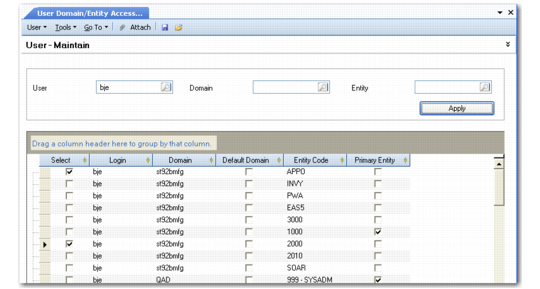
User Domain/Entity Access Maintain provides a workbench type screen for streamlining the setup of access. You can use the three selection criteria fields to limit the records you want to work with or leave them blank to see all combinations in the system. The grid supports standard sorting and group-by features so you can organize the data conveniently.
Clicking in check box in the Select column indicates that the user has access to the associated combination of domain and entity.
User Domain/Entity Access Maintain
You can also modify the user’s default domain by selecting the Default Domain check box. Selecting this for one entity in a domain activates the setting for all entities, since the setting applies domain wide.
Note: The Primary Entity column is for reference only and cannot be modified here. The domain’s primary entity is specified in the Domain Create activity.
Default
Select the check box on the row of the user’s default domain. Only one domain can be designated as default. In the .NET UI, the default domain displays only on the first login; on subsequent logins the state of the last session displays.
Note: In a multiple-database environment, a user’s default domain must be associated with the current database; it cannot be a connection record.
When a user logs in to the database, the system retrieves the information associated with the user’s ID. In the character interface, a user with access to more than one domain is prompted for a domain code, which defaults from the record marked as default.
A user with only one assigned domain does not see this prompt at login but is automatically logged in to the single domain associated with the ID specified.
Users employing the .NET UI can switch entities by opening a different workspace.