Report Chart of Accounts Create
Use Report Chart of Accounts Create to maintain a common reporting chart of accounts. You can define multiple report COAs.
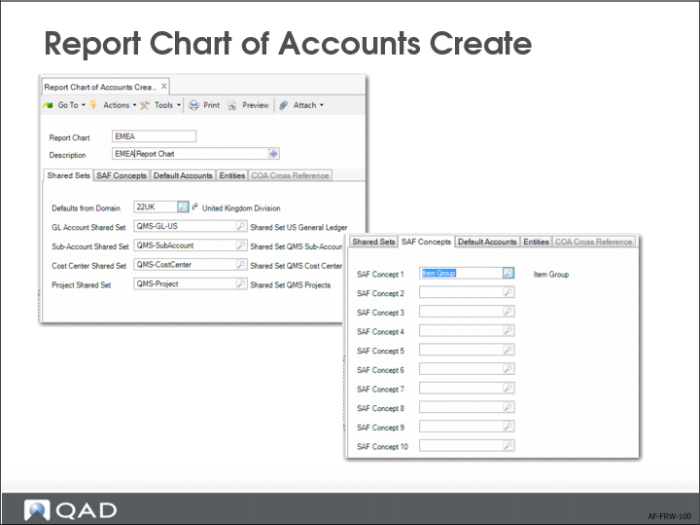
In the Shared Sets tab, you must define the shared sets for the source chart of accounts.
In the SAF Concepts tab, define the SAF concepts that constitute the source chart of accounts. Financial Report Writer can include SAF dimensions and bring SAFs from various structures and concepts together to create a central reporting SAF structure.
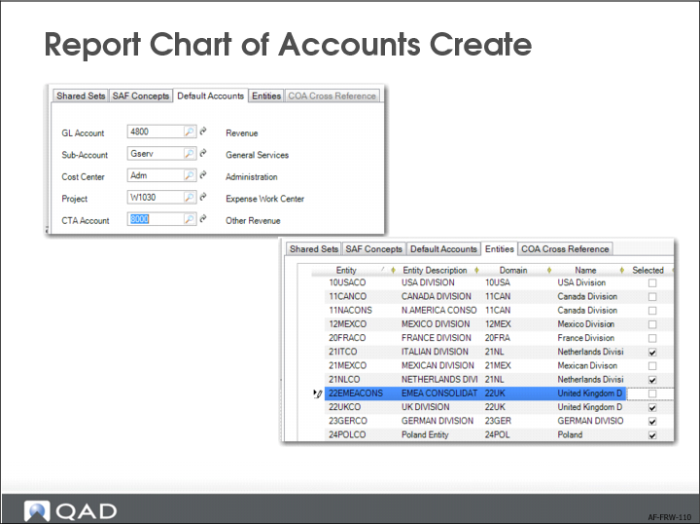
In the Default Accounts tab, define the default account, sub-account, cost center, and project (if you are using catch alls) and the currency translation adjustment account, if one is required.
The system uses the default account and analysis to fill in any gaps caused by missing mapping elements in the COA cross-reference used to translate from the source entity COA to the report chart COA. You can also leave these default codes blank to ensure that a missing translation is raised as an error during the generation of report cubes. In general, it is recommended that you leave these codes blank, unless you want to avoid errors generated by gaps in the COA translation. The CTA account is mandatory when you create report cubes that have a presentation currency other than the source entities’ base currencies.
In the Entities tab, specify the entities you want to include in Financial Report Writer. You can specify entities from any domain in the system. You must associate at least one entity with a report chart. If you delete or add entities for which COA cross-references are defined, the system displays a reminder that you must regenerate the COA cross-references.
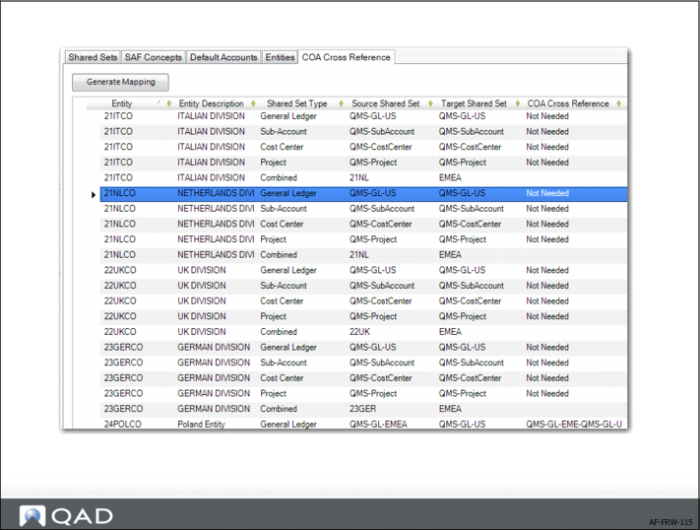
In the COA Cross Reference tab, specify COA cross-reference codes to map shared sets that are different in the source and target COAs. The COA Cross Reference tab is enabled when a GL shared set is specified in the Shared Sets tab and if at least one entity is specified in the Entities tab.
You can enter COA cross-references manually or have the system automatically generate a list of COA cross-references by clicking the Generate Mapping button. The system verifies if an existing COA cross-reference matches the combination of shared sets and retrieves that cross-reference. If there is no matching COA cross-reference, the system creates a COA cross-reference code that combines the source and target shared set names. The system-generated COA cross-references are of type Separate.
When the source and target shared sets are the same for a dimension, the system displays a Not Needed message and skips that shared set. You can manually specify COA cross-references of type Combined, which you can use for exceptions.
Note: If you modify a shared set and COA cross-references already exist for that shared set in the COA Cross Reference tab, the system displays a warning to remind you to update the cross-references.
If you have saved a COA cross-reference mapping for a report chart and subsequently modify the target shared sets or entities, you must re-click Generate Mapping. Generate Mapping does not re-generate the mappings for existing entities if the target shared sets have not changed. Therefore, the system does not overwrite any valid prior mappings.