Report Tree Maintenance
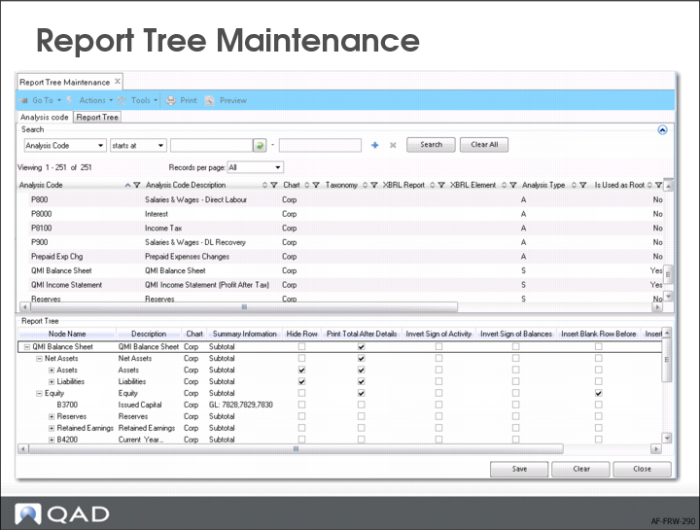
This slide shows Report Tree Maintenance.
You select report analysis codes from the list (browser), and drag them to the work area and drop them on any location in the tree. You can also create a report analysis code by right-clicking in the lower pane.
The Row Style field, which enables you to specify the appearance of a row in the report, is also available in the lower pane of Report Tree Maintenance. You can enter keywords in this field to format text in a report row as bold, underlined, and highlighted. Simply include the keywords you want to include, separated by a comma. For example, to format a report as bold and highlighted, enter bold,high in this column. The three keywords are:
• bold
• line
• high
In the Row Style field, you can also indicate that for transactions related to a particular leaf node, a report must display credit balances only or debit balances only. To show accounts with debit balances only, enter “dronly” in the Row Style field. To show accounts with credit balances only, enter “cronly” in the Row Style field. The option to display debit amounts only or credit amounts only is useful in Balance Sheet reports, where you can show, for example, bank accounts with a debit balance under Assets and bank accounts with a credit balance under Liabilities.
To insert a page break between different levels of detail, enter “page” in the Row Style field in Report Tree Maintenance at the level after which you want the page break. For example, if the highest level of information in the report tree is GL, and the next level is Entity, enter “page” in the Row Style field for the GL node. On the report, the entity details start on a new page after the GL details.
Select the Show Details field for any leaf node for which you want to print GL transactions in detail on the report. For this option to take effect, you must choose the Selected value in the Print GL Transactions field in Report Master Create. When running the report in Financial Report Run, you must also set the Print Details report selection criteria to Yes.