Refreshing Cost Sets
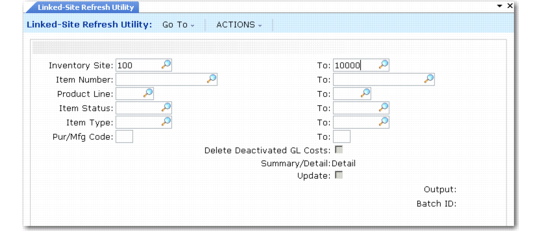
Use Linked-Site Refresh Utility (30.18.5) to update the GL cost source site and GL cost set records after entering rules in Linked-Site Rules Maintenance. Running this utility creates CST-ADJ transactions for records that meet the range of criteria you specify and generates a report of updated GL costs for the selected criteria.
Linked-Site Refresh Utility (30.18.5)
You can run a report at two levels of detail. A detailed report lists all old and new costs and cost source sites. A summary report provides only the cost source site changes. Set Update to No to generate a simulation report before running the refresh utility to show what records will be updated.
Because updates in systems with large volumes of data can be time consuming, consider running the refresh utility at the close of the day or whenever system resources are highest.
As part of the update process, you can also delete GL costs at inventory sites deactivated by linked-site costing by setting Delete Deactivated GL Costs to Yes. Deleted records are reported in detail only.
Important: To facilitate GL cost set management with linked-site costing active, use the same active GL cost set name at all sites. Only deactivated GL costs with the active GL cost set name are deleted when Delete Deactivated GL Costs is Yes.