Defining an Exchange File
An exchange file defines the documents communicated between the EC subsystem and your system. It includes data record structures that match the definition of the SNF communicated with the EC subsystem.
Note: You can use this program to modify an exchange file definition you have created yourself or one based on a copy of a QAD-developed template definition. However, the system does not allow you to modify a QAD-developed definition. If you attempt to do so, the program acts as an inquiry and shows the data in display-only mode. Use Exchange Definition Copy (35.15.1) to copy a definition before modifying it. See
Copying Exchange File Definitions.
Use Exchange Definition Maintenance (35.15.6) to define the layout and content of the exchange file documents. You can define records and fields in records.
Important: Create a different exchange file definition for each type of document.
Note: It is also possible to create an exchange file definition based on an existing document definition, as well as an external .xml or .xsd file, or on Progress source code that defines a temporary table. See
Creating Document Definitions.
The program consists of three standard frames. Optionally, when the exchange definition is used for mapping outbound documents to extensible markup language (XML) format, additional frames display.
Use the first frame to identify an exchange file definition by a unique combination of name, version, and direction. You can delete a definition by choosing Delete when the cursor is the Description field. However, if the system finds an existing transformation map or EC subsystem cross-reference record that references this definition, it displays an error message. Delete the transformation map in Transformation Definition Maintenance or the cross-reference in EC Subsystem/Exchange Maintenance before deleting the exchange file definition.
Note: You cannot delete QAD-provided exchange definitions.
Exchange Definition Maintenance (35.15.6), First Frame
Name
Enter a name for the exchange file definition.
Version
Enter a version number. You can use the same name for more than one definition, then use a different version number to differentiate among multiple definitions with the same name.
Additionally, you can use Direction—inbound or outbound—to distinguish between multiple definitions with the same name.
Direction
Enter the direction of the file transfer that uses this exchange file definition. Specify the direction relative to your system. Documents imported into your system are inbound, while documents exported from your system are outbound.
Desc
Optionally enter a text description of this exchange file definition. This description is for reference only.
Advanced
When this field is Yes, another frame lets you specify information related to XML translation of data. This field is enabled only for outbound definitions.
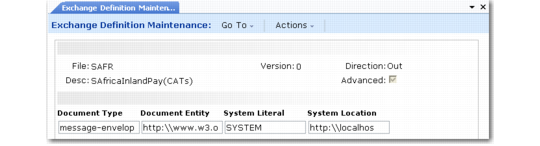
Exchange Definition Maintenance, XML Information Frame
Document Type
Enter the document-level XML identifier for the document that the system creates using this definition. The resulting XML document includes this identifier in the first line.
Document Entity
Enter the URL containing the namespace definition that controls the XML structure associated with documents created using this definition; for example, http://www.w3.org/2000/xmlns/.
An XML namespace is a collection of names, identified with a specific uniform reference locator (URL), which are used in XML documents as element types and attribute names.
System Literal
Specify whether the document type definition (DTD) used to validate the content of exported XML files is on a public server or within a system domain. Valid values are:
PUBLIC: The value specified in System Location is outside the local system domain.
SYSTEM: The specified system location is within the local system domain.
System Location
Enter the path to the location where the document type definition (DTD) used to validate the content of XML files is stored.
Use the next frame to define exchange file records.
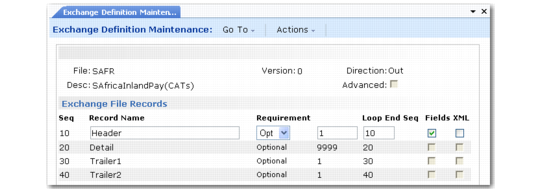
Exchange Definition Maintenance, Exchange File Records Frame
Seq
The sequence number of this record. Choose Insert to add a record. The system automatically assigns the next number, but you can change the value to any number. Set up a logical numerical hierarchy for record sequence numbers.
Important: In all cases, the first record in a document added to the repository must be sequence number 1. Other records can be numbered as you choose. The following examples show valid and invalid record sequences.
Valid | Invalid |
1, 2, 3, 4, 5 | 2, 3, 4, 5 |
1, 10, 20, 22, 30 | 10, 20, 22, 30 |
After you have used an exchange definition in a transformation definition, you cannot change record sequences in the exchange definition without deleting and reentering the entire transformation definition.
Record Name
Enter a name for this record. Each record name must be unique in an exchange file definition.
This record name is used as a variable during the transformation process, without the sequence number.
Requirement
Enter Mandatory to indicate that this record is required during the load or unload process or Optional to indicate that it is not. When the system cannot find a mandatory record to load or unload, it generates an error message and does not process the associated document.
Loop Occurs
Enter the number of times the processing logic loops through the records during transformation.
Loop Ends Seq
Enter a defined record sequence number to indicate where the loop ends. For example, enter a Loop Ends Seq value of 2 on sequence number 2 to indicate that the entire loop sequence takes place on a single record. Or, enter an end sequence of 4 on sequence number 3 to indicate a loop that starts at 3 and ends at 4.
To specify a loop structure that includes all records, enter zero or a number higher than the last record sequence defined.
Fields
Enter Yes to display an additional frame that lets you enter or edit the fields contained in this record.
XML, Namespace
Enter Yes to display a pop-up that lets you specify an XML namespace for this record. This field is enabled only for outbound definitions.
In XML, a namespace is a unique identifier for a collection of element type and attribute names. The namespace lets you use identical type and attribute names for multiple purposes based on the namespace identifier. The value entered here is prefixed to the field names in this record followed by a colon.
Use the last frame to edit or enter field information for the selected record. Choose Insert to add a field.
Note: This frame displays only when Fields is Yes for the selected record.
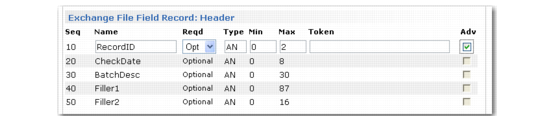
Exchange Definition Maintenance, Exchange File Field Record Frame
Seq
The sequence number of this field in the record. Choose Insert to add a field. The system automatically assigns the next available number. You can modify the number as needed or navigate to the blank fields at the bottom of the frame and assign numbers.
Note: It is recommended that you number the fields sequentially, beginning with 1. A total of 99 fields are then available for each record. Although the system accepts non-sequential numbers, their use is not recommended.
Name
Enter the name of the field. The name must be unique in the record. This field name is concatenated with the record name and used as a variable during the transformation process, without the sequence number.
Reqd
Enter Mandatory to indicate that this field is required during the load process or Optional to indicate that it is not. When the system cannot find mandatory fields to load, it generates an error message and does not process the associated record.
Type
Enter a code representing the type of data stored in this field. Valid entries are:
• AN: Alphanumeric
• D: Date
• I: Integer
• L: Logical
• R: Real number
Min
Enter the minimum number of characters allowed in this field. The system validates that required or optional data is greater than or equal to the minimum required value for the field.
Max
Enter the maximum number of characters allowed in this field.
• If the field lengths are variable and separated by the delimiter specified in EC Subsystem Definition Maint, the system validates that the field length is between the Min and Max values.
• If the field lengths are fixed, the system uses this value to calculate where each field starts and ends.
Token
A token is a critical variable used to populate the exchange file master record during the load process. It provides such information as the trading partner identifier or the document type. Tokens determine the specific way data is transformed between your system and the EC subsystem.
If applicable, enter the name of the token associated with this field. Valid values are the same as the values used when you define the EC subsystem.
At least tp-id and tp‑document-id must be defined.
Adv
Enter Yes to display another frame that lets you specify field-level information related to outbound XML translation of data. This field is enabled only for outbound definitions.
Exchange Definition Maintenance, Field XML Information
XML Tag
Optionally enter an alternate XML tag name associated with this field. If you do not enter a value, the system uses the field name as the tag.
XML Tag Type
Indicate the type of the specified XML tag. Valid values are Attribute and Element. The default is Element.
Namespace
Optionally enter the XML namespace associated with this field.
In XML, a namespace is a unique identifier for a collection of element type and attribute names. The namespace lets you use identical type and attribute names for multiple purposes based on the namespace identifier. The value entered here are prefixed to the field name followed by a colon.