Defining Trading Partner Parameters
Use Trading Partner Parameter Maint (35.13.10) to assign parameters and values to various trading-partner-specific processing actions.
The system creates a parameter record for each unique combination of trading partner address and site specified in Trading Partner Maintenance (35.13.7). If you delete an address and site combination in Trading Partner Maintenance, the parameter record for that combination is also deleted.
System-generated default values for some standard parameters are created at the same time the record is generated. Several of these parameters are used to specify values required by the import and export gateway programs. For example:
• Logical fields for a trading partner determine which types of documents you exchange with that partner.
• Another logical field specifies whether purchase orders imported from this trading partner are entered as confirmed sales orders.
• Character and integer parameters provide the gateway programs with the names and version numbers of the application document definitions used in processing.
Example: Logical parameters set default values for the EDI PO, EDI Schedule, and EDI PO Ack fields in Purchase Order Maintenance (5.7), Customer Scheduled Order Maintenance (7.3.13), and Sales Order Maintenance (7.1.1), respectively.
Program-specific parameters used by the programs on the Document Export Menu are included with the individual program descriptions.
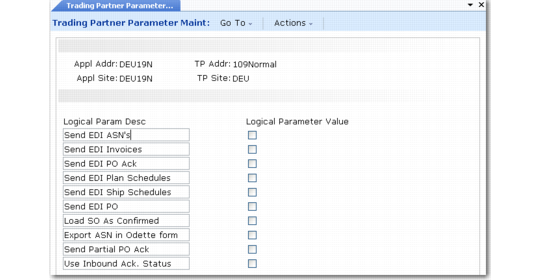
The program consists of five frames. In the first, you select the combination of trading partner address and site for which you want to define or modify parameters. In the bottom part of the frame, you can define up to 40 logical parameters. The first frame displays ten lines. Choose Go to access ten more.
Note: The system only displays frames that already include parameters. Frames with no entries are skipped.
Trading Partner Parameter Maint (35.13.10)
App Addr and App Site
Enter the address and site codes from your system that represent the trading partner whose parameters are defined in this record.
The system displays the corresponding trading partner address and site cross-references, defined in Trading Partner Maintenance, in the TP Addr and TP Site fields.
Logical Param Desc
Enter an alphanumeric description of the logical parameter defined in Logical Param Value.
Logical Param Value
Enter Yes or No to define the logical value of this parameter.
Continue to choose Go to display input screens where you can enter up to 40 descriptions and values for the following types of parameters:
• Character parameters. These parameters consist of up to 40 alphanumeric characters.
• Date parameters. Enter a date in MM/DD/YYYY format. The system validates this entry.
• Integer parameters. These parameters are positive or negative whole numbers of up to nine digits.
• Decimal parameters. These parameters are positive or negative decimal numbers. The system accepts up to eight characters to the left of the decimal point and two characters to the right.