Defining HTTP Adapters
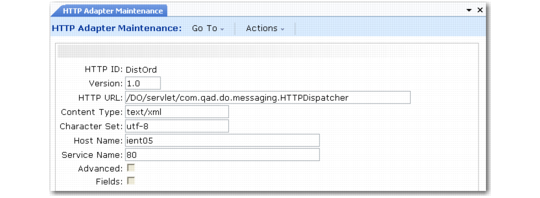
Use HTTP Adapter Maintenance (35.13.19) to define information for the system to use in posting documents in XML format to a server. This process makes the documents available to an external application after EDI eCommerce processing.
Associate connection records with trading partners using Transmission Group Maintenance (35.13.13). While sending records to that transmission group, the system passes the specified connection information and parameters, along with the XML data itself, to the receiving server using an HTTP adapter program.
HTTP Adapter Maintenance (35.13.19)
HTTP ID
Enter an alphanumeric code identifying this HTTP connection record. You reference this code in Transmission Group Maintenance to associate XML files with the server that receives them.
Version
Enter the HTTP version number associated with the parameters in this record.
HTTP URL
Enter the URL address on the specified host where the XML data is made available for the external application.
Content Type
Enter the type of content included in the files that are posted using this parameter record. Typically this value is text/xml.
Character Set
Enter the character set associated with the files that are posted using this parameter record; for example, utf-8.
Host Name
Enter the host name of the server to which the data is posted.
Service Name
Enter the port number on the specified host that your system uses for connecting with it.
Advanced
Enter Yes to display a text input frame. You can use it to enter additional values other than the default HTTP header information that is sent along with the protocol header, such as SOAPAction information.
Fields
Enter Yes to display another frame that lets you enter a set of parameter codes and associated values or token names that are appended to the specified URL.
HTTP Adapter Maintenance, HTTP Parameters Frame
Sequence
Enter the relative sequence of this parameter. The system appends the parameters to the URL according to this sequence.
Parameter Code
Enter the literal name of a parameter to append to the specified URL when it is posted to the HTTP server.
You can associate either of two types of values with this parameter:
• A hard-coded text string in the Parameter Data field.
• A variable value in the Token field. The system extracts the value associated with the token from the file and adds it to the URL as the value of this parameter.
For example, if Parameter Code is xxx and Parameter Data is yyy, the system adds xxx=yyy to the URL.
Parameter Data
Enter a literal text string to be associated with this parameter when it is appended to the specified URL.
If you enter a value in Token, leave this field blank.
Token
Enter a token to be associated with this parameter when it is appended to the specified URL. The system extracts the value associated with this token from the file and adds it to the URL as the value of this parameter.
If you enter a text string in Parameter Data, leave this field blank.