Defining Transmission Groups
Transmission groups consolidate multiple trading partners by network location so that outbound documents can be batched appropriately. For example, you can create a transmission group for all the trading partners on one value-added network (VAN).
When you set up trading partners who receive documents exported from your system, you assign them to a transmission group. This relationship indicates such information as where the system places outbound files for the trading partner.
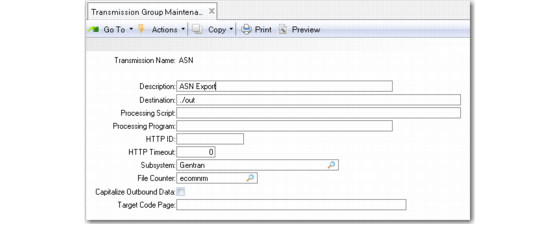
Use Transmission Group Maintenance (35.13.13) to define transmission groups.
Transmission Group Maintenance (35.13.13)
Transmission Name
Enter a name for the transmission group or use Next/Previous to scroll through the existing records and choose Go to select one.
Description
Enter a description of the transmission group, such as a company name.
Destination
Enter the directory where exported SNF files associated with this group are written. See
Setting Up Data Directories.
Processing Script
Optionally enter the file name of a custom script that is run after a group of documents is created. For example, this script can invoke an e-mail program to transmit the exported files to the trading partner.
Processing Program
Enter the path name to an executable program that runs when a file is exported to this transmission group. For example, the processing program can be an e-mail program that transmits the file to a trading partner.
To specify a processing program on a different computer, use the Remote Host Name field in the EC Subsystem Definition Maintenance record for the EC subsystem associated with this transmission group.
HTTP ID
Enter the code representing the set of parameters used to post XML data to a server for trading partners in this transmission group. If specified, HTTP ID must be a valid code defined in HTTP Adapter Maintenance (35.13.19). See
Defining HTTP Adapters.
By default, the Progress program edimhtad.p is used to post this data. If you use a custom-written processing program for this task, it set up the program to receive the following parameters:
• INPUT: The table storing parameter values (in matching pairs).
• INPUT: The XML pointer. This value can be blank. For edimhtad.p, the program is using the memory pointer from the XML document that was created in memory.
• INPUT-OUTPUT: The message table used to capture messages and pass messages back to the calling procedure.
• OUTPUT: The success flag used to determine if the process was successful.
HTTP Timeout
Enter the number of minutes that the system waits for a response from the HTTP posting process before displaying a timeout message. Leave the field set to the default (0) to have the system wait indefinitely.
Subsystem
Enter the EC subsystem associated with this transmission group. You must define this subsystem in EC Subsystem Definition Maint.
This field determines the file extension used for the SNF files sent to trading partners assigned to this transmission group.
File Name Counter
Specify the sequence ID that is used to assign file names to files exported to this transmission group. It must be a valid sequence ID defined in EC Number Range Maintenance.
Capitalize Outbound Data
Enter Yes to convert the data in exported files for this transmission group into all capital letters.
Target Code Page
Specify the code page that the receiving application requires for files sent to this transmission group. When creating the export file, the system converts the data as required to match the specified code page.
This field is not validated. Be sure that the value you enter is included in the Progress file DLC/convmap.cp. Otherwise, the conversion program returns an error.