Validating Data Values
Use Data Validation Maintenance (35.13.21) to define values that are automatically validated in inbound or outbound documents during the transformation process.
Note: Validation only takes place when the specified implementation definition has Validate set to Yes.
Define the required value down to the field level. If the data cannot be validated against the specified value during transformation, the system generates an error.
You can set up more than one data validation for same document, record, and field. The system then performs validation against each of the specified values. If the field’s value does not match one of the values specified, the system generates an error.
Because validation records are implementation-specific, you can define different validations for different trading partners.
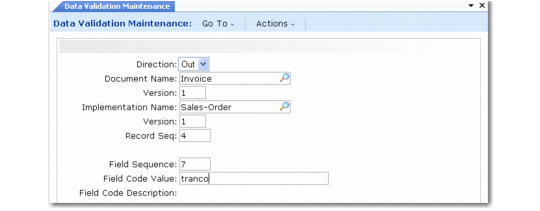
Data Validation Maintenance (35.13.21)
Direction
Enter the direction of the documents that have the field value validated. Documents imported into your system are inbound, while documents exported to the EC subsystem are outbound.
Document Name and Version
Enter the name and version of the document definition that contains the validated field.
Implementation Name and Version
Enter the name and version of the implementation associated with the validate document.
Record Seq
Enter the sequence number of the record containing the validated field.
Field Seq
Enter the sequence number of the field containing the validated value.
Field Code Value
Enter the value against which the field is validated.
Field Code Desc
The system displays the description from the field definition.
Use Data Validation Browse (35.13.22) or Data Validation Report (35.13.23) to view existing data codes.