Storing Inbound Turnaround Data
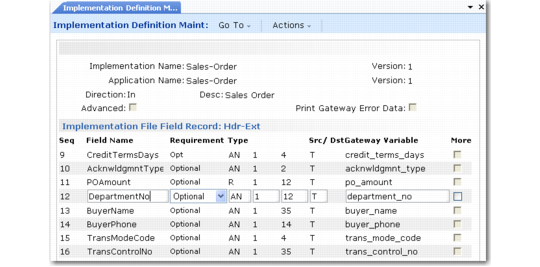
In Implementation Definition Maintenance, select the implementation that is being used for the inbound document. In the example shown in
Inbound Turnaround Data Implementation Record, the implementation is called Sales-Order.
By convention, the turnaround data fields are defined in the ext record definitions. Most implementation definitions contain ext records at both the header and detail levels of the document. You can store turnaround data any level—depending on which field values are selected for the Turnaround data index or key.
The example illustrated in
Inbound Turnaround Data Implementation Record uses the Hdr-Ext record, storing the inbound purchase order department number as turnaround data in the DepartmentNo field.
Inbound Turnaround Data Implementation Record
Set the Src/Dst field to T to indicate that the field is stored as turnaround data. The system then prompts you to define the table and index names to use for storing the inbound value.
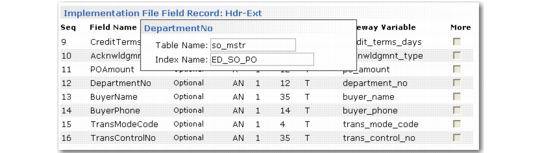
• Table Name: You can enter any constant value here; it becomes part of the index. By convention, using a table name helps create a logical reference to the data. For example, the record shown in
Turnaround Data Storage Index Prompt uses so_mstr, because the inbound purchase order results in a sales order.
• Index Name: The index name must be a valid variable name for the implementation you are using. During transformation, it contains the data that you want to store (index) the DepartmentNo data on. You can enter multiple data variables using commas (without any spaces) as separators.
For example, this record uses the variable ED_SO_PO as the index. This variable contains the purchase order number to be associated with the inbound department number. During invoice export, the system uses the PO number to retrieve the correct department number.
Important: The variable used for the index must contain data—that is, the record containing the data must precede the data being stored. For example, you cannot use a data variable from a detail record as an index to store turnaround at the header level.
Another consideration is the way you make the index unique. For example, ensure that subsequent records do not overwrite data you want to retain. Conversely, do not make the index so detailed that it is difficult to retrieve.
Turnaround Data Storage Index Prompt
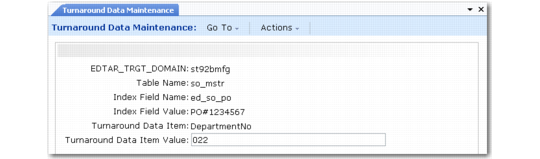
Turnaround Data Record illustrates an example of an imported record—as shown in Turnaround Data Maintenance—created using this implementation definition. The imported department number is 022.
Turnaround Data Record