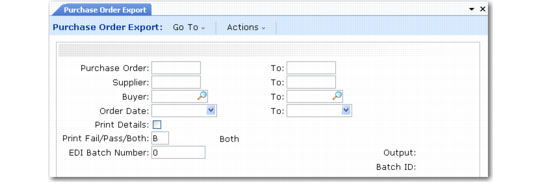
Exporting Purchase Orders
Use Purchase Order Export (35.4.9) to export a purchase order to a supplier.
Create purchase orders using Purchase Order Maintenance (5.7).
This export uses the following trading partner parameters, which are set up in Trading Partner Parameter Maint (35.13.10):
• Logical position 06: Send EDI PO; set to Yes or No
• Character: PO Document Name; set to the name of the application document definition to use (for example, MFG850)
• Integer: PO Document Ver; set to the version number of the application document definition to use
See
QAD Purchasing User Guide for information on purchase orders.
Important: When you plan to export purchase orders to a supplier, set Send EDI PO to Yes for that supplier in Trading Partner Parameter Maint. This action sets the EDI PO field to Yes in the purchase order trailer so that the order is available for selection in Purchase Order Export.
This program is similar to the other export programs on the menu. Enter selection criteria to indicate which purchase orders are exported. To reexport a purchase order, enter the batch number that was assigned during an earlier export process.
You can also use this program to export purchase orders that have been automatically generated from EMT sales orders. Ordinarily, you use eCommerce Manager to export such POs. However, Purchase Order Export lets you enter selection criteria to specify a range of POs or even a single PO to export.
See
QAD Sales User Guide for
information on EMT.
Purchase Order Export (35.4.9)