Maintain eCommerce Repository Data Collection
In the QAD .NET UI, Maintain eCommerce Repository Data allows you to view and update EDI eCommerce repository and status records from a single workbench-style access point.
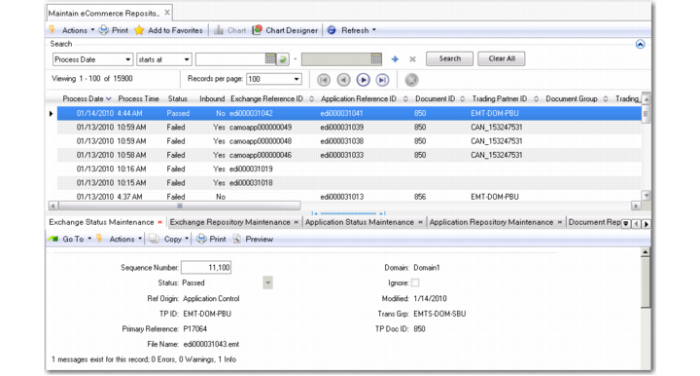
In the initial browse window, use standard .NET UI filtering functions to limit the selection of documents based on process date, status, document direction, trading partner ID, and several other criteria. Next, select a record from the main browse window. The system populates the Sequence ID field in each of the five associated programs (shown as tabs below the browse window) based on the selected record:
Maintain eCommerce Repository Data
After selecting a record, you can use the workbench functions to:
• View status and processing messages in either the exchange or application repository. This function is similar to the standard Exchange Doc Status Inquiry and Application Doc Status Inquiry programs, with some added functionality: You can also update the Passed/Failed status in either repository. Additionally, you can select an Ignore field, which makes the document unavailable for reprocessing through either the workbench Document Reprocess program or the menu-level Import Reprocessing/Export Reprocessing programs.
• Modify information in the associated exchange or application repository document. The two workbench repository maintenance programs are similar to the menu-level Exchange Data Repository Maint and Application Data Repository Maint functions. The main difference is that the workbench programs display less read-only data because it is available in the main browse window.
• Reprocess the updated records in both repositories using values that you have updated in the other programs. This function is similar to the menu-level Import Reprocessing and Export Reprocessing functions.
Note: Reprocessing only takes place on the repository level. To reimport or re-export a file, use Document Import or the appropriate program—based on the document type—from the Document Export menu.