Turnaround Data
Turnaround data consists of inbound data items that do not match existing database fields but are required for related outbound documents.
Turnaround data is defined in Implementation Definition Maint (35.15.13). During gateway processing, the system relates it to index information provided in Implementation Definition Maint and stores it in the turnaround data table. During outbound processing, the system uses the turnaround data mapping table to relate the turnaround data to the outbound document.
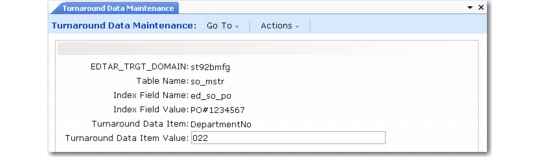
Use Turnaround Data Maintenance (35.9.17) to modify turnaround data.
You can edit only one field in this program—Turnaround Data Item Value. The other key fields identify the location of the data.
Turnaround Data Maintenance (35.9.17)
Target Domain
Enter the domain associated with the turnaround data you want to maintain. The default is your current working domain.
Table Name
Enter the name of the table associated with this turnaround data item, or use the arrow keys to scroll through a list of tables. The table name is specified in the turnaround data mapping table. For example, if the turnaround data is related to a sales order, table name could be so_mstr.
Note: Turnaround data is not stored in the table. Instead, it is stored in a set of turnaround repository tables that use the table and field names as part of the index.
Index Field Name
The name of the field associated with this turnaround data item. The field name is specified in the turnaround data mapping table. For example, if the turnaround data is related to a sales order, this value could be so_nbr.
Index Field Value
The value of the variable associated with this turnaround data. For example, if the turnaround data is related to a sales order, this value could be the sales order number.
Turnaround Data Item
The name of the turnaround variable.
Turnaround Data Item Value
The value of the turnaround data. Modify it as needed and choose Go to save your changes.