Financial Tables
Financial table relationships differ slightly from operational table relationships. In financial entity diagrams:
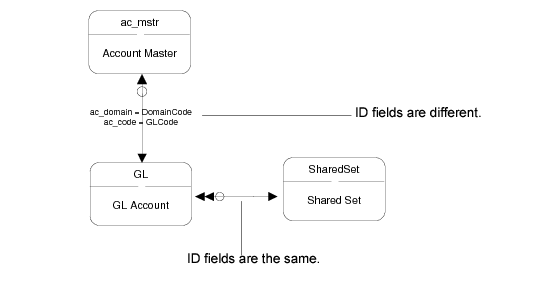
• The key to most relationships between financial tables is an ID field. In most cases, the ID field is the same for both tables. When they are the same, the ID field is not included in the financial entity diagrams. When the ID field is not the same, it is included; see
Financial Diagrams Differences, ID Fields.
• Some relationships show multiple arrows. This indicates that multiple fields are linked between the tables. For example, the Year End Close diagram has four arrows between the YearClosing and GL tables. This is because the YearClosing table contains four fields that are GL accounts and point to the GL Account table; see
Year End Close.
• Some diagrams depict Q-variant tables that hold temporary data. The dotted-line tables have names that start with the letter Q; for example, QPostingLine. Typically, the records in the Q tables are created when certain actions or transactions occur, then the system transfers the data to other permanent tables and deletes the data in the temporary Q tables.
• Some diagrams include a line without arrows that indicates an indirect relationship for retrieving the domain code for certain types of data. This occurs when financial data that is specific to a shared set is also stored in operational tables that are domain specific. For example, data stored in the journal table is based on shared sets. Data in the corresponding operational daybook table (dy_mstr) is based on domains. To determine the applicable domain for a particular daybook, the system references the information stored in the DomainSharedSet table. See
Daybook.
Financial Diagrams Differences, ID Fields