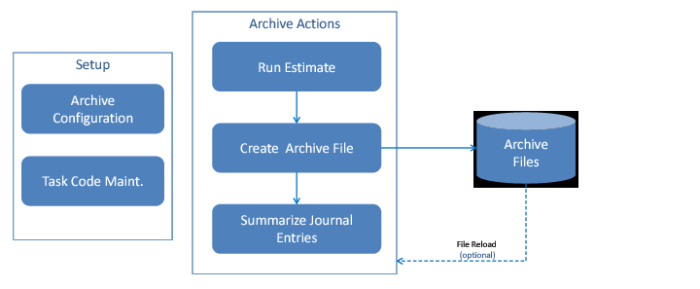
Data Archive Workflow
The workflow in
Journal Entry Data Archiving Workflow displays the main steps involved in the journal entry archiving process:
Journal Entry Data Archiving Workflow
1 Complete data archive configuration.
2 Create an archive task code where you can specify an entity group.
3 Run an estimate report to view a simulated result such as the number of records to be archived and the space to be freed up.
4 Run the archive action to create an archive file in a predefined file location.
5 After the archive file is generated, run the summarize action to summarize the archived journal entries. The system removes the original journal entries from the database and creates new summarized journal entries to keep the account balances.
6 When needed, restore the archive file to the system. The system removes the summarized journal entries and reloads the original journal entries.