Summarizing Journal Entries
After generating an archive file, run the Summarize action to remove the archived journal entries from the database and to create a summarized journal entry to keep the account balances. Only an archived period can be summarized, which ensures that all summarized periods already have a generated archive file.
The system summarizes journal entries by period for each entity and year. The summary posting is always on the last day of the GL period. The summarized journal entry description displays the data summarization execution date.
Journal entries are summarized using the original daybook and by COA key such as account, sub-account, cost center, project, SAF, intercompany code, currency, and daybook.
Period 00 and the last period are for year-end closing and are not summarized, but they are still archived.
During archiving and summarizing, the system keeps the audit trail information. To see archiving status and detail information, run Archive Audit Trail Report.
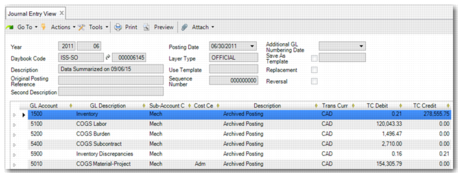
Journal Entry View displays an example of a newly created summarized journal entry. The posting date is always the last day of the period. To keep the original account debit and credit activity amount, the system sums the debit and credit amounts, without netting them. Therefore, the total of the account activity remains the same.
Journal Entry View
Before and after you run the Summarize action, it is recommended that you run GL Balance versus Transactions (25.21.2.2). This report can help you to verify whether the sum of all detailed transactions equals the balance. This step ensures that you have a consistent set of data before you start archiving.