Period Mark View
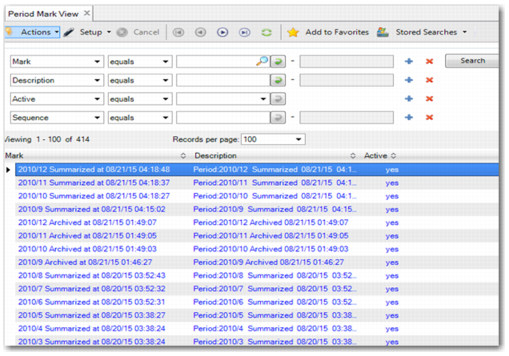
Period Mark View (25.4.2.7) displays the related archive status, including the status for Archive and Summarize actions, File Reload, and Data Re-archive. For example, after a period has been archived, the period mark status displays the archived status and the date and time of execution.
Period Mark View
For example, for period 2010/12, the period mark displays the status for different actions as follows:
• The status for the Archive action includes Archiving and Archived:
• 2010/12 Archiving at 08/21/15 01:42:00
• 2010/12 Archived at 08/21/15 01:49:00
If the period has been archived successfully, the period mark in
Period Mark View displays the final status as Archived.
• Assuming that you are running Data Re-Archive to regenerate an archive file, the status of the period mark for the Re-Archive action is set to ReArchiving:
• 2010/12 ReArchiving at 08/21/15 02:30:00
If the period has been rearchived, the period mark displays as Archived.
• The status for the Summarize action includes Summarizing and Summarized:
• 2010/12 Summarizing at 08/21/15 04:12:00
• 2014/12 Summarized at 08/21/15 04:18:48
If the period has been summarized successfully, the period mark displays the final status as Summarized.
• The status for Archive File Reload includes Removing, Removed, Reloading, and Reloaded. First, the system removes the summarized journal entry that the system created when you ran the Summarize action. Next, the system begins to reload the original journal entry using the original posting ID.
• 2010/12 Removing at 08/21/15 10:01:00
• 2010/12 Removed at 08/21/15 10:05:00
• 2010/12 Reloading at 08/21/15 10:05:00
• 2010/12 Reloaded at 08/21/15 10:09:00
If the period has been removed successfully, the period mark displays the status as Removed. The period mark displays the final status as Reloaded when the original posting has been reloaded successfully.