Recording Prepayments with Reconciliation Keys
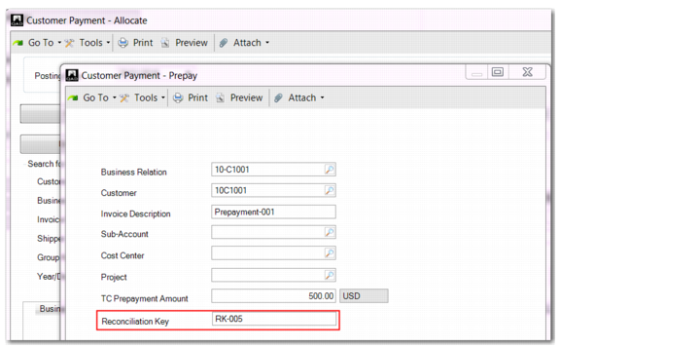
In functions that allow you to enter prepayments and process them, you can record a reconciliation key, which helps you to search and find tax invoices and prepayments for manual reconciliation.
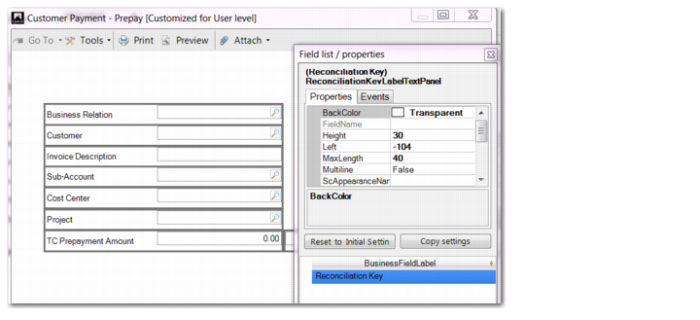
The Reconciliation Key field is hidden by default and you must add it using Design Mode. You can add the Reconciliation Key field in Design Mode in the following AR-related programs:
• Customer Payment Create/Modify/View
• Banking Entry Create/Modify/View
• Customer Invoice Create/Modify/View
Note: For invoices originating from the operational side, such as invoices generated using Invoice Post & Print, the system automatically populates the Reconciliation Key field with a default value.
Prepay Frame of Customer Payment Create, Design Mode
In the following programs, Reconciliation Key is a grid column that you can make visible by right-clicking on the grid headers and choosing Columns:
• Open Item Adjustment Create/Modify/View
• Customer Opening Balance Create/Modify/View
Before you issue a final invoice to the customer, you can record multiple prepayments.
Customer Payment Create, Prepayment with Reconciliation Key