Exchange Rate Provider Integration
Manually entering exchange rates on a daily basis is time-consuming and also leads to errors. To save time and improve accuracy, you can integrate the system with third-party exchange rate providers to automate the update process.
There are a number of third-party providers who offer reliable exchange rates for many currencies. The exchange rates are updated daily to reflect the fluctuations in the markets.
For each third-party exchange rate provider, you can configure a set of exchange rates to update at a particular time of day.
The basic steps to set up a third-party exchange rate provider are:
1 Request an authentication key from the third party exchange rate provider.
2 Add the authentication key in server.xml.
3 Define the third-party provider in the system.
4 Configure the exchange rate pairs you want to maintain.
5 Schedule daily updates of the exchange rates.
6 Send the exchange rate import results to the e-mail address defined for users linked to the role specified in Exchange Rate Provider (26.5).
Exchange Rate Provider
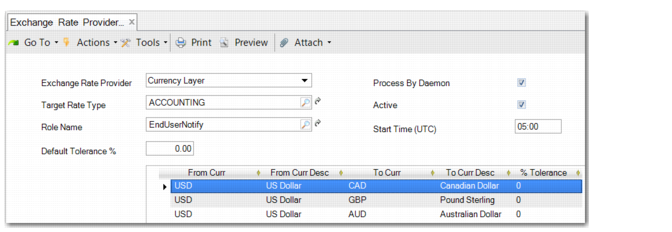
Exchange Rate Provider (26.5) enables you to define a set of exchange rates to maintain for a third-party exchange rate provider. You can also configure a tolerance level for rate fluctuations and a schedule for using a daemon to update the exchange rate sets automatically.
Exchange Rate Provider Create
Provider
Select the third-party exchange rate provider you want to set up; for example, Currency Layer.
Target Rate Type
Select an exchange rate type from the defined types.
Role Name
Optionally, you can enter a role. Any users linked to this role will receive an e-mail when this set of exchange rates is updated.
Default Tolerance %
This field enables you to set a default fluctuation tolerance for this set of exchange rates. However, the tolerance only automatically applies to any rates you create in the grid after you set the tolerance. You must manually change any rates that already exist when you are modifying an existing record.
Process by Daemon
When you select this field, the exchange rates are processed by the Batch daemon rather than being imported manually using Exchange Rate Integration.
Active
Select this field to make the set of exchange rates active.
Start Time (UTC)
Enter the time when the updated exchange rates are to take effect each day. The daemon will run at this time. You cannot modify an exchange rate set while any records are being processed by the daemon.
In the grid, you add rows of currency pairs that you want exchange rates for. Use the lookup to add a currency to the From Curr field. In the To Curr field, you can add multiple currency pairs simultaneously in the lookup. Select target currencies using the Ctrl key for specific currencies or the Shift key for a range, and press the Enter key. The entries in the From Curr and To Curr fields cannot be identical.
In the grid, you can also specify a tolerance percentage at line level for each exchange rate. Click Save when you have finished the configuration.
You can modify the configuration in Exchange Rate Provider Modify (26.5.2). Review the exchange rate types you create for any provider in Exchange Rate Provider View (26.5.3).
Exchange Rate Provider Integration
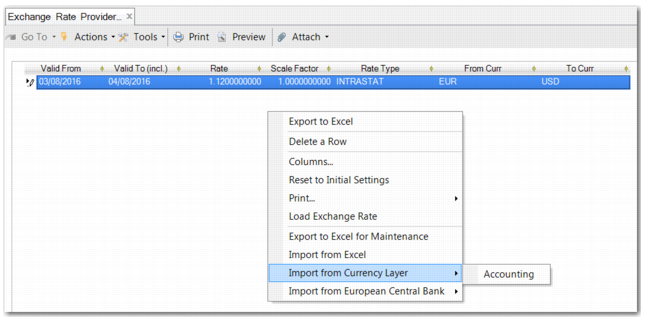
In Exchange Rate Provider Integration (26.4.7), you can import exchange rates manually from the third-party provider. The context menu includes the third-party exchange rate providers and their exchange rate types, as displayed in
Exchange Rate Provider Integration. The context menu changes dynamically as new providers and exchange rate types are added. However, only active sets of rates are displayed.
Select an exchange rate type from the menu to import the rates from the provider. You can add multiple sets of rates to the grid. When you click Save, the rates are imported and applied to the exchange rate set you have set up.
Note: When you open Exchange Rate Provider Integration and there are no active exchange rate providers in the system, a warning is displayed stating that you have not yet defined an active provider.
Exchange Rate Provider Integration
You can also use Exchange Rate Provider Integration to import rates from Excel and to export rates to Excel for maintenance. Exchange Rate Excel Integration (26.4.6) offers the same functions.
Importing by Daemon
Instead of using Exchange Rate Provider Integration, you can use the Batch daemon to automate the update of exchange rates in the system. According to the settings you configure in Exchange Rate Provider, the Batch daemon automatically imports exchange rate sets on a daily basis.
Note: You also use the Batch daemon to process exchange rate sets that you change manually in Exchange Rate Provider Modify.
Batch Daemon Configure (36.14.16.19.1) enables you to specify the number of records to process in one batch and configure other daemon settings. The Batch Daemon Monitor (36.14.16.19.3) displays the current daemon status, whether there are records queued for processing, and the results of any processing. At the time specified in Exchange Rate Provider, the exchange rates from the third-party provider are queued and processed, and the updated rates take effect.
When you use the daemon to import exchange rates, there is an error when the exchange rate is outside the tolerance value. The result of processing is e-mailed to all users associated with the role specified in Exchange Rate Provider.