Navigation
Important: Beginning with QAD Enterprise Edition 2014, you can run the Fixed Assets module in Desktop mode. The only case where you must run the screen in Terminal mode is in Fixed Asset Maintenance (32.3) when an asset has a depreciation based on units of production (UOP).
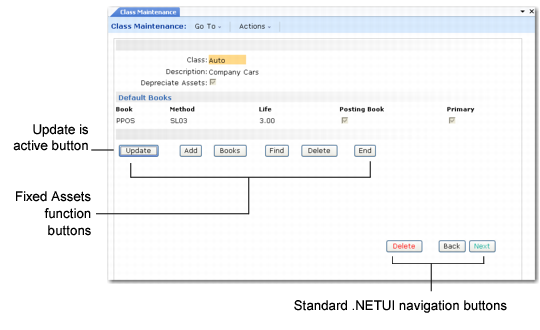
The Fixed Assets module contains navigation buttons for modifying information or accessing additional screens within a program. The buttons at the bottom of the screen include standard buttons and program‑specific buttons. The standard buttons are:
• Update: Update, change, or correct an entry.
• Add: Add a new record.
• Find: Enter an ID to go directly to a record.
• Delete: Delete a record.
• End: Return to the previous function.
In the .NET User Interface, click the button to execute the associated function. In the character UI, use the arrow keys or tab keys to access the buttons and then press Enter or F1.
For keyboard navigation in the .NET UI, use the Tab key to move forward between the buttons and Shift+Tab to move backward. Press the spacebar to execute the function associated with the active button.
Note: In the .NET UI, pressing Enter is the same as clicking Next. This typically has no effect when the buttons are active.
Fixed Asset Control (32.24)
The Fixed Asset End button and the .NET UI Back button execute the same function; similarly, the two Delete buttons execute the same function.