Setting Up Business Rules
Set up business rules to define your accounting needs and customize Fixed Assets to meet your specific needs. Business rules provide defaults for assets entered in Fixed Asset Maintenance (32.3), minimizing data entry and errors.
Before you begin setting up your company’s business rules, you should decide on some basic information.
• Your company’s fixed‑asset locations
• If your company uses custom calendars for non‑posting fixed‑asset books or if your books follow the GL calendar
• What and how many fixed‑asset books your company needs to set up
• Which system-supplied depreciation methods your company uses
• Which depreciation methods you use for financial and tax purposes
• What classes you define for grouping similar assets
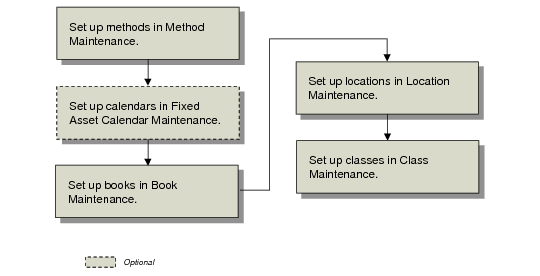
Business Rules Workflow summarizes the steps required to set up the business rules.
Business Rules Workflow