Setting Up Fixed‑Asset Calendars
Use Fixed Asset Calendar Maintenance (32.1.5) to set up optional fixed‑asset calendars for non‑posting books. Use this program to add and delete fixed‑asset calendars. You can use the Find function to go directly to a fixed‑asset calendar by entering the calendar ID.
You can associate a fixed‑asset calendar with non‑posting books in Book Maintenance (32.1.9). You cannot associate a fixed‑asset calendar with posting books. Posting books automatically follow the GL calendar set up in Financial Calendar Setup Menu (25.4).
You cannot modify a fixed‑asset calendar after an asset has been assigned to a book that uses the calendar.
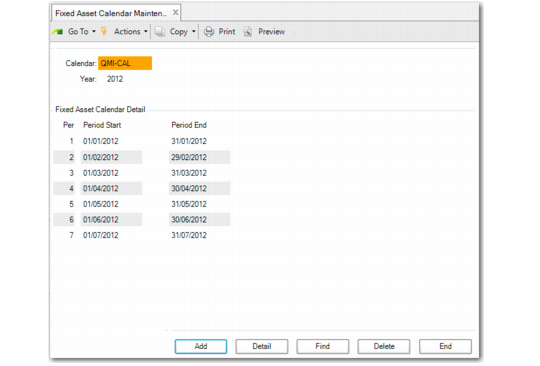
Fixed Asset Calendar Maintenance (32.1.5)
Click Add to create a new calendar.
Calendar
Enter up to an eight‑character calendar ID.
Year
Enter the year that applies to this fixed‑asset calendar.
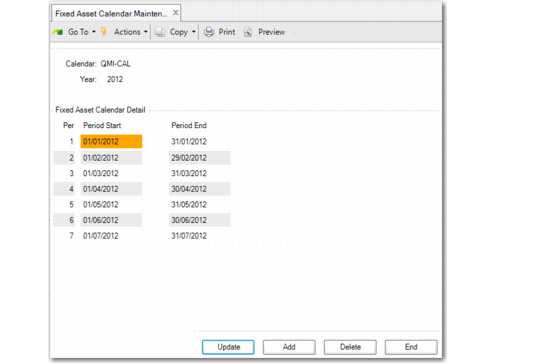
Click Detail and then Update to define fixed-asset calendar periods and their start and end dates.
Fixed Asset Calendar Maintenance, Fixed Asset Calendar Detail
Period Start
Enter the start date for this period. The default is one day after the previous Period Finish date. Periods cannot overlap.
Period End
Enter the end date for this period. Periods cannot overlap.
A warning displays if the calendar does not cover an entire year.