Setting Up Methods
Use Method Maintenance (32.1.1) to specify the depreciation methods that your company uses. Depreciation allocates an asset cost to periods in its service life. Depreciation affects both tax and financial reporting.
Before you can use one of the supplied methods, you must copy it and give it a new ID. After the method is copied, you can update, modify, or delete the copied method.
Active depreciation methods are assigned to assets in Fixed Asset Maintenance and can be assigned as class defaults in Class Maintenance. Methods identify how annual depreciation is calculated for the asset. You cannot modify methods that are assigned to assets.
You can use several methods to calculate depreciation. Assets can be depreciated one way for tax reporting purposes and another for financial purposes. Depreciation methods for tax purposes are usually based on the type of asset and the tax laws in effect when the asset was placed in service. Depreciation methods for financial or management purposes usually follow generally accepted accounting practices and policies.
The following depreciation methods are supplied with Fixed Assets:
1 Straight Line
2 Units of Production
3 Declining Balance
4 Sum of the Years’ Digits
5 Flat Rate
6 Custom Table
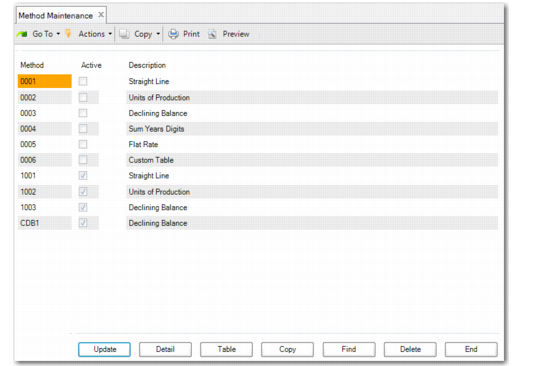
Method Maintenance (32.1.1)
Select one of the standard methods and click Copy to create a new method based on it. You are prompted to specify an ID.
Method
Enter an identifier for the copied depreciation method. This is a four‑character alphanumeric ID and cannot start with a zero.
Methods starting with a zero are system‑supplied. To use a system‑supplied depreciation method, you must copy it and then make it active.
Click Update to indicate if the method is active and provide a description.
Active
Enter Yes if this depreciation method is active. Enter No if it is not active. Active is always set to No for system‑supplied depreciation methods and cannot be changed. After you copy the method, you can set the Active field to Yes.
Note: If you change this field from Yes to No and this method is used by any classes, update the classes to use another active method before using them again. Otherwise, an error displays when you create new assets that use the classes.
Description
Enter a brief (55 characters) description of the method to display on lookups and reports.
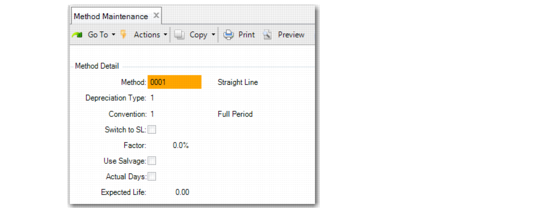
Choose the Detail function to display attributes of the copied method. Click Update to enable the attribute fields for changes.
Note: You cannot modify a method after it has been associated with a fixed asset.
Method Maintenance, Method Detail
Convention
Conventions determine how much depreciation is taken in the first and last period of an asset life. See
Using Conventions.
Enter the number that corresponds to the convention for this method.
1: Full Period. A full-period depreciation is calculated for the first period of the asset life. No depreciation is calculated for the last period of the asset life. Depreciation is calculated as if the asset was put into and taken out of service the first day of the month.
2: Half Period. A half-period depreciation is calculated for the first and last period of the asset life.
3: Next Period. A full-period depreciation is calculated for the period following the period that the asset was placed into service. A full-period depreciation is taken in the last period of the asset life.
4: Full Quarter. A full-quarter depreciation is calculated for the first quarter of the asset life. No depreciation is calculated for the last quarter of the asset life.
Full‑Quarter Depreciation Factors lists the factors used in calculating depreciation for the asset acquisition quarter.
Full‑Quarter Depreciation Factors
Quarter in Service | Acquisition Factor | Retirement Factor |
1 | 100% | 0% |
2 | 75% | 25% |
3 | 50% | 50% |
4 | 25% | 75% |
5: Half Quarter. A half-quarter depreciation is calculated for the first and last quarter of the asset life.
Half‑Quarter Depreciation Factors indicates the factors used in calculating depreciation for the asset acquisition and retirement quarters.
Half‑Quarter Depreciation Factors
Quarter in Service | Acquisition Factor | Retirement Factor |
1 | 87.5% | 12.5% |
2 | 62.5% | 37.5% |
3 | 37.5% | 62.5% |
4 | 12.5% | 87.5% |
6: Full Year. A full year of depreciation is taken regardless of the period that the asset was put into service. No depreciation is calculated for the last year of the asset life.
7: Half Year (Standard). A half-year depreciation is calculated for the first and last year of the asset life.
8: Modified Half Year (Version 1). If the asset is put into service in the first half of the year, a full year of depreciation is calculated for the year. If the asset is put in service in the second half of the year, no depreciation is taken. If the asset is disposed of in the first half of the year, no depreciation is calculated for the year. If the asset is disposed of in the second half of the year, a full-year depreciation is taken.
9: Modified Half Year (Version 2). If the asset is put into service in the first half of the year, a full year of depreciation is calculated for the year. If the asset is put in service in the second half of the year, a half-year depreciation is calculated. If the asset is disposed of in the first half of the year, no depreciation is calculated for the year. If the asset is disposed of in the second half of the year, a half-year depreciation is calculated.
Valid Depreciation Method and Convention Combinations indicates which conventions are valid for each depreciation method.
Valid Depreciation Method and Convention Combinations
| | Conventions |
| | 1 | 2 | 3 | 4 | 5 | 6 | 7 | 8 | 9 |
Depreciation Methods | Straight Line | | | | | | | | | |
Units of Production | | | | | | | | | |
Declining Balance | | | | | | | | | |
Sum of the Years’ Digits | | | | | | | | | |
Flat Rate | | | | | | | | | |
Custom Table | | | | | | | | | |
Switch to Straight Line (SL)
If Yes, the declining‑balance depreciation method switches to the straight‑line method when the depreciation calculated using the straight‑line method is greater than the depreciation calculated using the declining‑balance method.
Factor
Enter the depreciation factor rate expressed as a percentage. This percentage is used to calculate the depreciation per period. Factor only applies to declining‑balance and flat‑rate depreciation methods.
Declining balance uses the factor percentage against the net book value of the asset at the beginning of each fiscal year.
Use Salvage
This field indicates whether the depreciation method reduces the cost by the salvage value to calculate the depreciation basis. Salvage value is the book value the asset is expected to have at the end of its expected life.
Actual Days
If Yes, the actual calendar days in the period that the asset is put into service are used when calculating the depreciation expense.
After the annual depreciation is calculated, it is divided by a standard 365 to determine the calendar‑day depreciable expense. Depreciation expense for each period is defined as the number of calendar days in the period times the daily depreciation expense.
Expected Life
Enter the expected useful life for assets depreciated by this method. The expected life is used in calculating depreciation over the life of the asset.
This field is required if the depreciation method is a custom table. Otherwise, it is used as the default life for the method in Class Maintenance and Fixed Asset Maintenance.
If the method is based on the QAD Custom Table method, you can use the Table function to create a custom depreciation table.
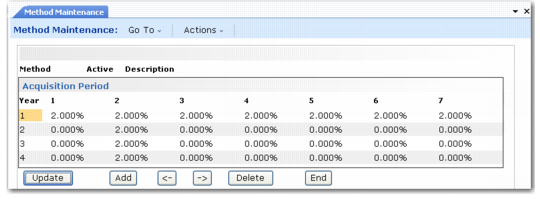
Method Maintenance, Custom Table
Click Add to add information to the table. A new row opens where you can specify the year and percentage amounts for each period. Use the arrow functions to move right or left through the period detail.
Year
Enter a year for the estimated asset life. For example, enter 1 if this is the first year of the asset life. This field cannot exceed the estimated asset life plus one year.
Percentage Factor
Enter a percentage factor to use for calculating the annual amount of depreciation. The total percentage of each period column must equal 100%.