Setting Up Locations
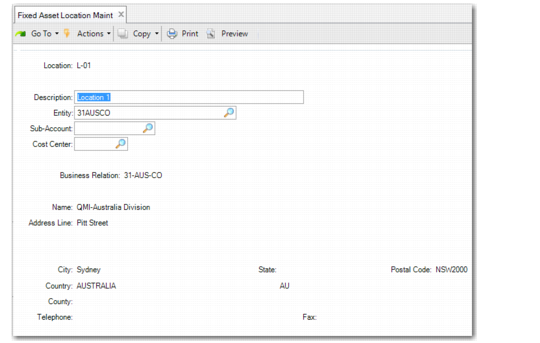
Use Location Maintenance (32.1.13) to set up, modify, and delete fixed‑asset locations. Use the Find function to view the Location Browse by location ID.
Asset locations identify the accounting location and entity of the fixed asset and the default sub‑accounts and cost centers for depreciation reporting.
Note: In contrast to location IDs used elsewhere in the system, fixed‑asset location IDs are generally used to locate an asset for tax and asset tracking purposes. There is no connection between the fixed‑asset location and inventory location. For example, you cannot issue inventory from a fixed‑asset location.
Location Maintenance (32.1.13)
Location
Enter a unique ID identifying a fixed‑asset location.
Description
Enter a brief description (maximum 32 characters) of this fixed‑asset location.
Entity
Enter a valid, active entity code to associate with this location.
Sub‑Account
Enter a sub‑account code. This sub‑account defaults for assets entered in Fixed Asset Maintenance for this location.
Cost Center
Enter a cost center code. This cost center defaults for assets entered in Fixed Asset Maintenance for this location.
Business Relation
If address information is needed for the location, specify a business relation. Address details from the headoffice address type of this business relation are used. For more information on business relations, see
QAD Financials User Guide.
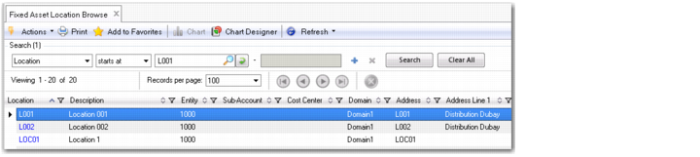
Fixed Asset Location Browse
The Fixed Asset Location Browse (32.5.23) lets you view location details, such as the location ID, description, domain, entity, sub-account, cost center, address, city, county, state, zip, country, phone, and fax for each location that matches the search criteria.
Fixed Asset Location Browse